
TRENDING
Free photo tool
Passport and visa photos at the exact size, with a check before you apply
Pick your country and document. Digieh AI finds your head and shoulders, sets the head size the rules ask for, and checks light, background and sharpness. Then download the digital file for online forms or a print sheet.
100 countries, 248 documentsHead size set to the rulesPhoto check reportExact pixels and KB4×6 and A4 print sheetsFamily sheetCamera coach
IDlume Passport Photo Maker
1Choose your country and document
2Add your photo
Drop your photo here or tap to choose
JPG, PNG or WebP. A photo from your phone’s rear camera works best.
Before you take the photo: 7 quick tips
- Ask someone to take it, or use a timer. Selfies make the nose look bigger and are not accepted in the US.
- Stand 1.2 to 1.5 metres (4 to 5 feet) from the camera, and about 1 metre from the wall so no shadow falls behind you.
- Face a window in daylight. Light should fall evenly on both sides of your face.
- Use a plain white or light wall with nothing on it.
- Turn off portrait mode, beauty mode, filters and HDR.
- Look straight at the camera with a neutral face, mouth closed and both eyes open.
- Take off glasses, hats and headphones. Religious head coverings are allowed if your face is fully visible.
Starting the camera…
3Check the lines and your report
Top of head and chin
Digieh AI placed the gold lines. Drag a line if it is not exactly at the top of your hair or the bottom of your chin. The gold box shows the final photo.
Top of head
Chin
Your photo
Last checks only you can confirm
Digital photo for online forms
Exact pixel size at 300 DPI. Add a file size limit if your form has one.
Print sheet
Print at home or at a photo shop on glossy photo paper, at actual size.
Family sheet: add each person’s finished photo, then download one sheet with everyone.
Your photo is checked and sized on your device.
How to make a perfect US passport photo, with a real example
We made this photo from our sample in about a minute, using every main feature. Tap Try our sample photo above and follow the same steps.
Pick the country
Choose United States and Passport (51 x 51 mm). The size, pixels, head range and background appear.
Open the sample
Tap Try our sample photo, or add your own photo taken in daylight.
Check the gold lines
Digieh AI puts lines at the top of the head and the chin. Drag one if it is a little off.
Set the head size
Move Head size to about 30 mm, the middle of the 25 to 35 mm US range.
Read the report
Every measured check should show a tick. If one says Fix, follow its tip and retake.
Tick the last checks
Confirm eyes open, mouth closed, no glasses and no filter.
Download the digital file
Tap Download digital photo for the 600 x 600 px file used in online renewals.
Print a sheet
Pick 4 x 6 in and tap Download print sheet. You get 6 photos to cut out.
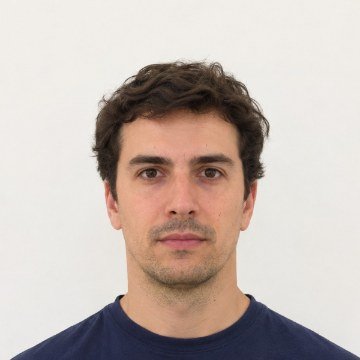
Settings we used
| Setting | What we used |
|---|---|
| Country and document | United States, Passport, 51 x 51 mm |
| Head size | 30 mm, inside the 25 to 35 mm range |
| Background | White, plain |
| Digital file | 600 x 600 px, 300 DPI |
| Print sheet | 4 x 6 in, 6 photos |
| Result | all measured checks passed |
How to make a passport photo online
1
Choose country and document
IDlume loads the photo size, pixels, head size and background color for that document.
2
Add or take your photo
Upload a photo or use the camera coach. Digieh AI finds the top of your head and your chin.
3
Check and download
Fix anything the report flags, then download the digital file or a print sheet.
Why photos get rejected, and how IDlume helps
Most rejected photos fail on simple things: the head is too big or too small, the background is grey, one side of the face is dark, or the photo was edited. IDlume measures each of these and tells you exactly what to fix. It never retouches your face, and for countries that do not accept edits it only crops and sizes your photo, so you are not caught out by the rules.
What IDlume checks
| Check | What it does |
|---|---|
| Head size | Measured from chin to top of hair and set inside the range for your document |
| Space around the head | Warns if the photo is too tight to crop at the right size |
| Background | Checks it is plain, close to the right color and has no shadow behind you |
| Light on the face | Compares the left and right side and the overall brightness |
| Sharpness and resolution | Measures focus on the face and pixels for a 300 DPI print |
| Color photo | Warns if the photo looks black and white or filtered |
Tips for a photo that passes
Use daylight from a window
Stand facing the window. Even light on both sides of the face fixes most rejections.
Ask a helper, 4 to 5 feet away
A photo from a little distance looks natural. Close selfies stretch the face and the US does not accept them.
Print on photo paper at actual size
Choose 100% or actual size in the print settings, never fit to page, or the size will be wrong.
Frequently asked questions
Is IDlume free?
Yes. Making, checking and downloading your photo and print sheets is free with no sign-up and no watermark. The optional background tidy has 3 free uses a day.
Which countries and documents are included?
About 100 countries and 248 documents, including passports, visas, ID cards, residence permits and driving licences. Pick your country to see its documents.
Will my photo be accepted?
IDlume follows the published size rules and checks the things that cause most rejections, but the final decision is always made by the passport or visa office. Read the official rules for your document before you apply.
Does IDlume edit my face?
No. IDlume never retouches, smooths or changes your face. It crops and resizes the photo. For countries that do not accept edited photos, the background tidy is turned off.
Can I take the photo with my phone?
Yes. Ask someone to take it from about 4 to 5 feet away in daylight, against a plain light wall. The camera coach shows an oval and tells you if the light is too dark or uneven.
How do I print a passport photo at home?
Download the print sheet, choose 4 x 6 in or A4, and print it on glossy photo paper at 100% or actual size. Then cut along the dashed lines.
What size is a US passport photo?
A US passport photo is 2 x 2 inches (51 x 51 mm), with the head between 1 and 1 3/8 inches (25 to 35 mm) from the chin to the top of the hair, on a white or off-white background.
Can I make photos for my whole family?
Yes. Make each photo, tap Add to family sheet, and then download one print sheet with everyone on it, even if the sizes are different.
Can I set a file size in KB?
Yes. Enter a minimum and maximum KB under the digital photo and IDlume saves the photo inside that range where possible.
Is my photo uploaded?
No. Your photo is checked and sized on your device.
Where does the size data come from?
Sizes come from the open Passport Photo Specs dataset, which lists a government source for each document, and the head sizes for the US, UK, Canada and Schengen countries come from their official rules.
Photo sizes: Passport Photo Specs open dataset, version 1.1.0 (MIT/CC BY 4.0), checked against official pages for the main countries. Always confirm the rules on your government's official page.
How can we make IDlume better?
Missing a country or document, or did a check look wrong? Tell us. We read every note.