
TRENDING
Digieh AI image tool
Artlume, turn any image into useful text
Copy the words from a photo, screenshot or handwritten note. Turn a table into a spreadsheet, translate a sign, explain a chart, save a business card as a contact, or get a ready prompt from a picture. Digieh AI does the reading and Artlume checks every answer.
10 free images a dayNo sign-upAny languageHandwriting
Turn an image into text
What should Digieh AI do?
Need more than 10 a day? Digieh Pro reads 200 images a day and up to 20 at once.
Starting…
Text from your image
Your photo is made smaller and cleaned of hidden data on your device. Digieh AI reads it on a secure server and Digieh does not keep it.
Digieh Tools Pro
Need more? Go Pro
Free is great for everyday images. Pro is built for big jobs like a stack of receipts or a full notebook.
- Read 200 images a day, not just 10
- Up to 20 images at once
- Download all results as one ZIP
- One Lifetime key works in every Digieh tool
Tested guides for every Artlume job
We ran each job on a real sample image and show the exact result, so you know what to expect.
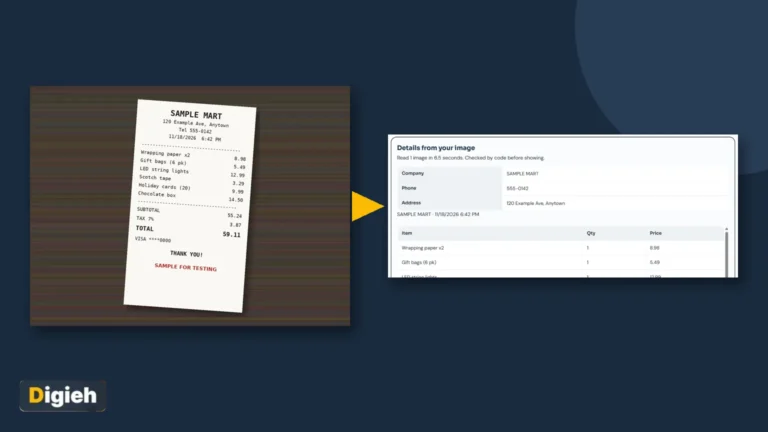 Receipt to spreadsheetTurn store receipts into rows for Excel or Sheets.Read the tested guide →
 Business card to contactSave a paper card to your phone in one tap.Read the tested guide →
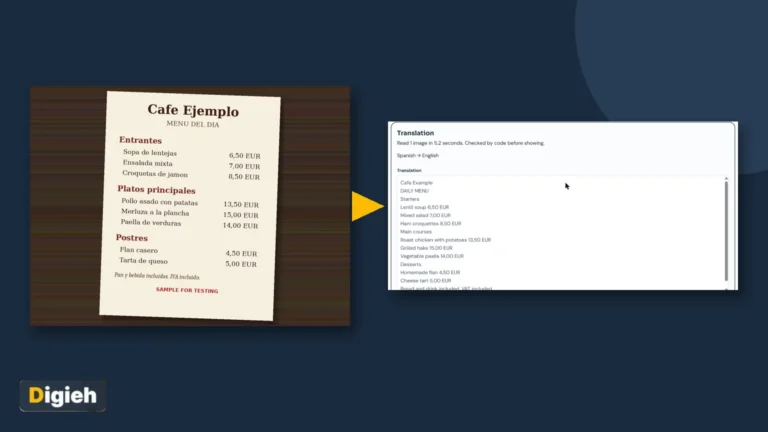 Translate a menu photoRead any menu in your language while traveling.Read the tested guide →
 Handwritten notes to textType up a page of pen notes in seconds.Read the tested guide →
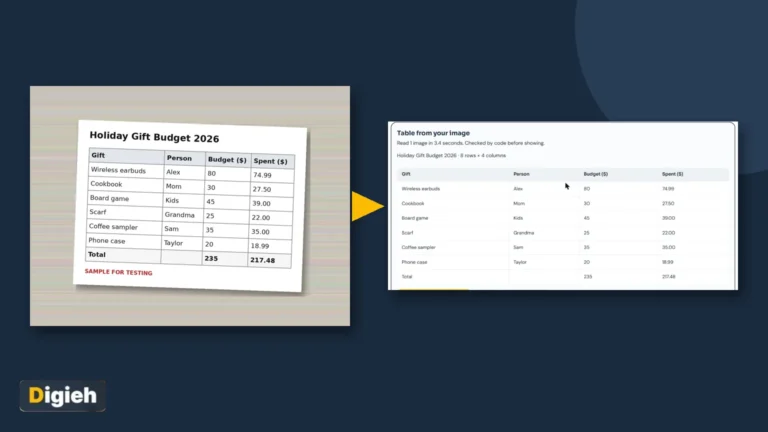 Table photo to ExcelRebuild a printed table as a real spreadsheet.Read the tested guide →
 Copy text from any imageEvery way to copy text from photos and screenshots.Read the tested guide →
Image to text in three steps
1
Add your image
Drop it, paste a screenshot with Ctrl+V, tap to choose, or take a photo with your phone.
2
Pick a job
Copy text, table to Excel, translate, image to prompt, explain, card or receipt, or ask a question.
3
Copy or download
Copy the result, or download it as a .txt, a CSV for Excel or a phone contact.
Why Artlume is different
Many free image to text sites upload your photo, show ads between steps, or stop at one image an hour. Artlume makes your photo smaller and removes hidden location and camera data on your device first. Digieh AI then reads it, and code checks the answer before you see it, such as making table rows line up and adding up receipt totals.
What Artlume can read for you
| Image | What you get |
|---|---|
| Printed text | Copied word for word, in reading order |
| Handwriting | Clear handwriting is read, unclear words are marked [?] |
| Tables | Every row lined up, ready for Excel or Google Sheets |
| Other languages | Urdu, Arabic, Hindi, Chinese and many more, plus translation |
| Charts and memes | The main point and the key numbers, in plain words |
| Business cards | Name, phone, email and website as a phone contact (.vcf) |
| Receipts | Items and prices as a CSV, with a code check of the total |
| Pictures | A detailed prompt, a short prompt and the best aspect ratio |
Tips for the best result
Sharp and bright
Hold the phone steady and avoid shadows. Fill the frame with the text.
Crop long pages
For a very long page, crop it into two images for the most accurate copy.
Pick the right job
Use Table to Excel for grids and Card or receipt for contacts and bills.
Frequently asked questions
Is Artlume free?
Yes, you get 10 free images a day with no sign-up. Digieh Pro gives you 200 images a day and up to 20 images at once.
Can it read handwriting?
Yes. Clear handwriting usually reads well. Words that are hard to read are marked [?] so you can check them.
Which languages does it read?
Most languages, including English, Urdu, Arabic, Hindi, Chinese, Spanish and French. It can also translate the text into the language you pick.
Are my images kept?
No. Your image is made smaller on your device first, and hidden location and camera data is removed. Digieh AI reads it on a secure server and Digieh does not keep it.
Can I turn a table photo into Excel?
Yes. Pick Table to Excel and download the CSV file. It opens in Excel, Google Sheets and Numbers.
What is image to prompt?
It describes a picture as a prompt you can paste into an AI image maker to create a similar image, with a short version and things to avoid.
Can it tell me who is in a photo?
No. Digieh AI never names or guesses who a real person is. It describes people in general words only.
Does it work on a phone?
Yes. It works in Chrome and Safari on Android and iPhone, and you can take a photo straight from the tool.
How can we make Artlume better?
Tell us what to add, what felt slow, or what you loved. We read every note.
More free tools from Digieh
Paperlume OCR PDF
Make a scanned PDF searchable and copyable.
Postlume Alt Text Generator
Short alt text for images, for accessibility and SEO.
Pixlume Image Compressor
Make photos smaller or hit an exact KB size.
Cleanlume Photo Privacy Cleaner
Remove hidden location and camera data, blur faces.
Cardlume Greeting Card Maker
Cards with your exact words in any language.
Paperlume JPG to PDF
Turn photos and scans into one tidy PDF.
Read the step-by-step guide: how to copy text from any image →