TRENDING
Receipt to Spreadsheet: Track Holiday Spending From Photos
Receipt to spreadsheet, tested: turn a receipt photo into a .csv file for Excel or Sheets. See our real result, photo tips and a free holiday spending sheet.

7 min read
Last updated November 20, 2026
To turn a receipt photo into a spreadsheet, take a flat, well-lit photo and open Artlume. Pick Card or receipt mode. Then download the .csv file and open it in Excel or Google Sheets.
We tested this on a sample holiday receipt. Every item, the tax and the total came through correctly, and the tool checked that the prices added up.
Key Takeaways.
- A clear, flat photo matters more than any app setting.
- Artlume reads store name, date, items, subtotal, tax and total in one step.
- It checks that item prices add up to the subtotal before showing results.
- Download the .csv file and open it in Excel or Google Sheets.
- Check quantities by eye, since a quantity written inside an item name can be missed.
Jump to a section
- Our test result
- Step-by-step guide
- How to take a good receipt photo
- What to check before saving
- Build a holiday spending sheet
- Other free ways
- How long to keep receipts
- Privacy and limits
- Frequently asked questions
- Conclusion
Our Test: A Sample Holiday Receipt
TestedTested on November 20, 2026 with Artlume in Card or receipt mode. Our sample image was read in 6.5 seconds on the free plan.
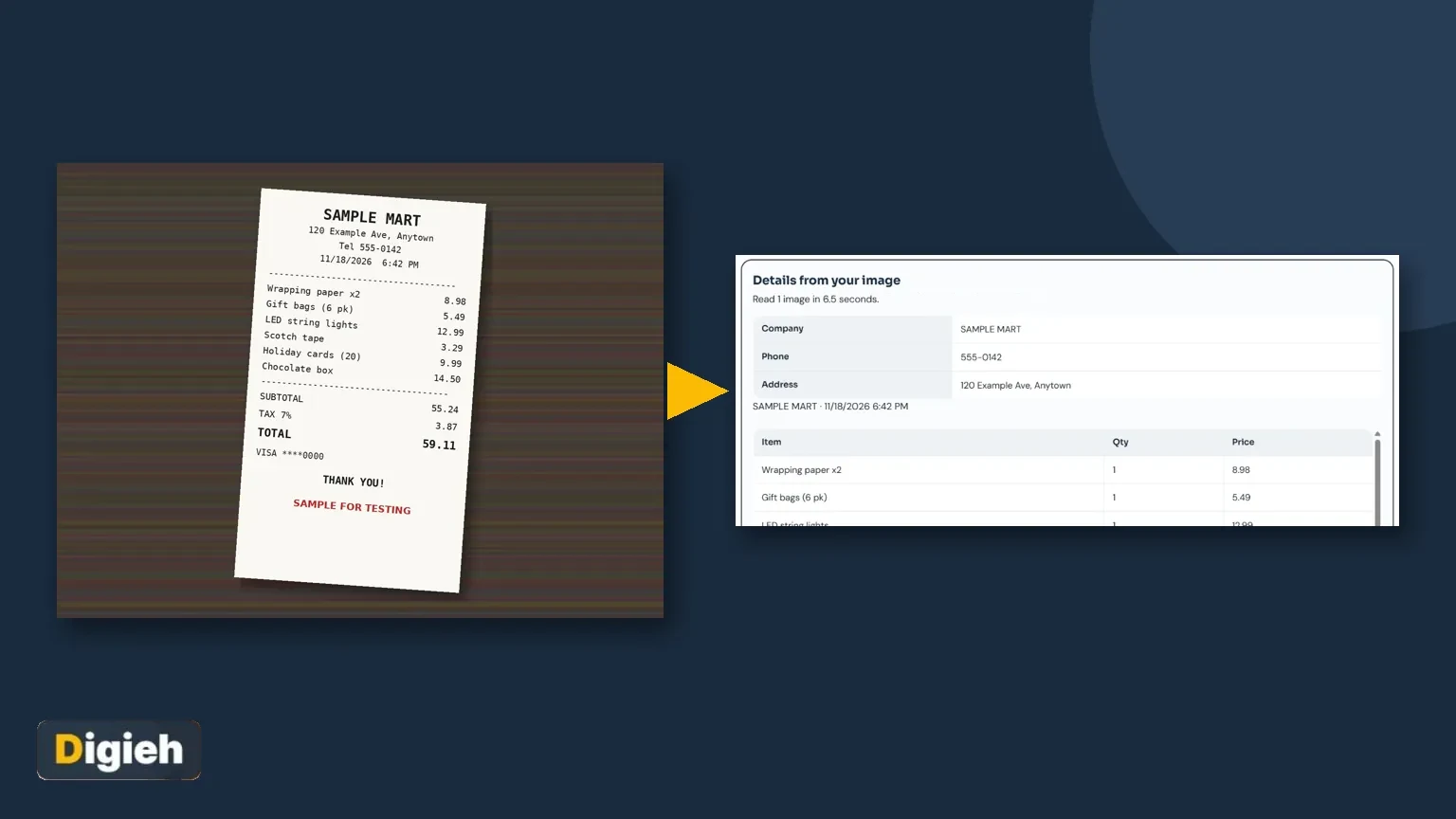
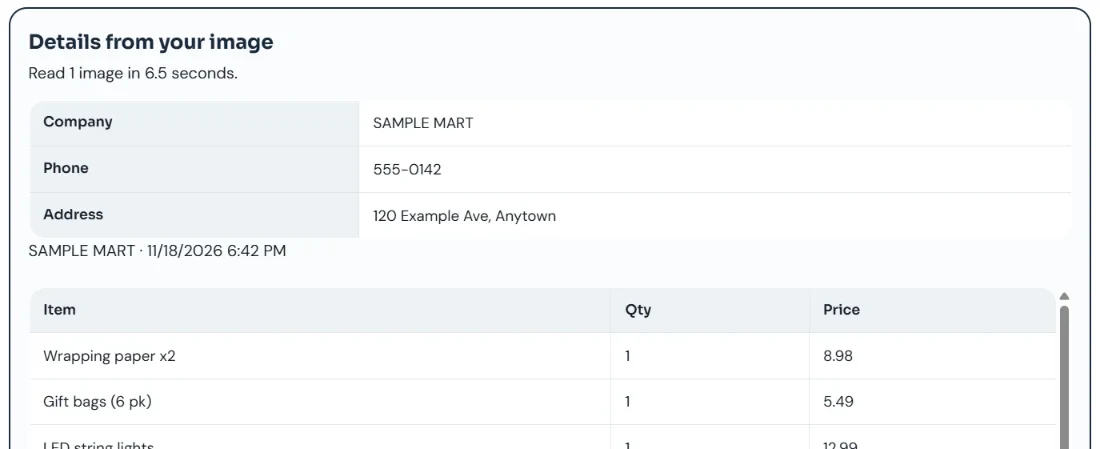
We made a sample store receipt with six holiday items, tax and a total. It is clearly marked as a test image. Here is the photo we uploaded.

Artlume returned the store details, a line-by-line item table and the totals. It also printed a check line that the item prices add up to 55.24.
| What we checked | Receipt | Artlume result |
|---|---|---|
| Store and date | Sample Mart, 11/18/2026 6:42 PM | Correct |
| Items | 6 lines | 6 lines, all prices correct |
| Subtotal | 55.24 | 55.24, totals match |
| Tax | 3.87 | 3.87 |
| Total | 59.11 | 59.11 |
| Quantity | Wrapping paper x2 | Read as 1, with x2 kept in the name |
Source: Digieh test on November 20, 2026, using the Artlume image to text tool.
The one thing to fix by hand was a quantity. The receipt said x2 inside the item name, so the quantity column showed 1. The price was still right.
Step-by-Step: Receipt Photo to Spreadsheet
- Lay the receipt flat on a dark surface and take a straight photo.
- Open Artlume on your phone or computer.
- Drop the photo in, paste it with Ctrl+V, or tap Take a photo.
- Choose the Card or receipt tile.
- Tap Read the card or receipt and wait a few seconds.
- Look over the items and totals on screen.
- Tap Download for Excel to save a .csv file.
- Open the file in Excel, Google Sheets or Numbers.
The .csv file opens in any spreadsheet app. In Google Sheets, use File, then Import, then Upload.
Many receipts? The free plan reads one image at a time. A Pro key lets you add up to 20 receipts at once and download all results as one ZIP file.
How to Take a Good Receipt Photo
- Flatten curled receipts under a book for a minute first.
- Use daylight or a bright lamp, and avoid your own shadow.
- Fill the frame with the receipt, with a little border.
- Hold the phone straight above, not at an angle.
- Tap the screen to focus on the printed numbers.
- Photograph long receipts in two halves if needed.
Thermal receipts fade over time, especially in heat or sunlight. Photograph them soon after shopping, while the print is dark.
How do you track holiday spending now?
- Spreadsheet
- Banking app
- Paper notes
- Not sure
What to Check Before You Save
- Quantities, especially when written as x2 or 2 @ in the item name.
- Discounts and coupons, which may appear as negative lines.
- Tax lines, if the store lists more than one.
- The date format, since some stores print day first.
- Totals, which Artlume checks against the item prices for you.
A quick look takes under a minute. It saves fixing errors later when you add up a whole month.
Build a Simple Holiday Spending Sheet
Paste each receipt’s rows into one master sheet. Add a few columns so you can sort and total by person or category.
| Column | What to put in it | Example |
|---|---|---|
| Date | Purchase date | 11/18/2026 |
| Store | Where you bought it | Sample Mart |
| Item | What you bought | Holiday string lights |
| Category | Gifts, decor, food, wrap | Decor |
| For | Who it is for | Home |
| Amount | Price paid | 12.99 |
Source: Digieh template. Amounts come from our sample receipt test with the Artlume tool.
Use a sum formula on the Amount column for your running total. A pivot table, or a simple filter, then shows spending by category.
Planning gifts with a budget? Our guide on smarter holiday shopping pairs well with this sheet.
Free updates
Join the Digieh list
Be the first to know when our weekly brief launches.
No spam. Unsubscribe anytime. Read our Privacy Policy.
Other Free Ways to Read a Receipt
| Method | Best for | Limits |
|---|---|---|
| Artlume | Full item table and .csv in one step | 10 free images a day |
| Phone Live Text | Copying a single total or line | No table or spreadsheet file |
| Excel Data from Picture | Clean printed tables | Needs Microsoft 365 |
| Typing it in | One or two receipts | Slow for many |
Source: Apple Support and Microsoft Support, plus our Artlume test.
On iPhone, Live Text lets you copy text from a photo by touching and holding it, says Apple. It is handy for one number, but you still type each row.
Microsoft says Excel for Microsoft 365 can insert data from a picture. It works best on clean tables, and receipts are not always laid out as grids.
For a deeper look at every method, see our pillar guide, how to copy text from any image.
How Long to Keep Receipts
For taxes, the Internal Revenue Service (IRS) says to keep records for three years in most cases. Some situations need longer, like six or seven years.
Keep the photo and the spreadsheet together in one folder. Check the tax agency’s record rules for your own case.
For gift returns, keep holiday receipts until return windows close. Our holiday return policies guide lists the main store deadlines.
Common Problems and Easy Fixes
| Problem | Likely cause | Fix |
|---|---|---|
| Items missing | Receipt cut off in the photo | Retake with the whole receipt in frame |
| Wrong numbers | Blur or shadow over digits | Use brighter light and tap to focus |
| Totals do not match | A coupon or a missed line | Check discounts, then compare with the paper |
| Dates look odd | Day-first date format | Fix the format in your spreadsheet |
| Strange symbols in Excel | File opened with the wrong encoding | Use Import instead of double-clicking the file |
Source: Digieh testing notes from the Artlume tool.
Most problems come from the photo, not the reader. A second, sharper photo fixes nearly all of them in seconds.
If your store emails receipts, you can screenshot the email and paste it in with Ctrl+V. Screenshots are usually the cleanest input of all.
Keep one folder per month for photos and spreadsheets. When tax time or a return comes, everything is already sorted by date.
Privacy and Limits
Artlume shrinks your photo and removes hidden photo data, such as location, on your device before upload. The page says Digieh does not keep your image after reading it.
The free plan reads 10 images a day with no sign-up. A Digieh Pro key raises that to 200 a day and lets you add up to 20 images at once.
Good habit. Avoid uploading full card numbers, bank details or identity documents to any online tool. Cover them with your finger or crop them out first.
Try this today. Photograph today’s receipts tonight and run one through Artlume. Start your holiday sheet with real numbers.
Test Yourself
What should you check by hand after reading a receipt?
- The store logo
- Quantities written inside item names
- The paper color
In our test, x2 inside an item name was read as quantity 1.
Frequently Asked Questions
Can I scan receipts into Excel for free?
Yes. Artlume reads 10 images a day free and gives you a .csv file that opens in Excel.
Does it work with faded receipts?
Light fading is usually fine. Very faded thermal paper may need a brighter photo or typing by hand.
Can it read receipts in other languages?
Yes, it reads many languages. Check prices and dates carefully, since formats differ by country.
Does Digieh keep my receipt?
No. The page says your image is read on a secure server and not kept.
Can I add many receipts at once?
With a Pro key, you can add up to 20 receipts in one go and download a ZIP.
Conclusion
A flat photo and one tap turn a receipt into rows you can total. Our test came back correct, with only one quantity to fix by eye.
Your next step is to start a holiday sheet and add this week’s receipts.
Editor’s Note
This article is accurate as of November 20, 2026. Test results come from our own run of Artlume on a Digieh sample image marked for testing. Feature details come from the official help pages linked above.
Spot an error in this article? Please contact us at support@digieh.com or read our Corrections Policy.
Keep exploring
Your next read is waiting
 1MarketingGoogle Business Profile Setup: Get Found Locally Free7 min read
 2TechnologyTV Size Calculator: Best Screen for Your Room7 min read
 3Food & LifestyleGreek Yogurt vs Regular: Protein, Sugar and Calcium7 min read
 4Beauty & Personal CareRetinol for Beginners: How to Start Without Irritation7 min read
 5Pets & AnimalsDog Years Calculator: Your Dog’s Age by Size7 min read
 6Travel & TourismFlight Canceled: Your Refund Rights and Next Steps5 min read
Found this useful?