TRENDING
How to Copy Text From Any Image, Free
Copy text from any image free on iPhone, Android or Windows. Steps for Live Text, Google Lens, Snipping Tool, plus a free tool for handwriting and tables.


7 min read
Last updated November 20, 2026
Copy text from any image in seconds. Your iPhone, Android phone and Windows computer each have a free built-in tool that reads printed words in a photo.
For handwriting, tables, other languages and receipts, a browser tool such as Artlume does more. This guide shows every method step by step.
Key Takeaways.
- iPhone and iPad use Live Text in the Photos app.
- Android phones use Google Lens inside Google Photos.
- Windows 11 and 10 use Text actions in the Snipping Tool, and it runs on your computer.
- Artlume works on any device and also reads handwriting, tables and receipts.
Jump to a section
- Which method to use
- iPhone and iPad
- Android
- Windows
- Any device with Artlume
- Tables, cards and receipts
- Sharper results
- When text comes out wrong
- Keep it private
- Frequently asked questions
- Conclusion
Which Method Should You Use?
Start with the tool built into your device for clear printed text. Use a smarter tool when the image is messy, handwritten or full of tables.
| Method | Device | Cost | Handwriting | Tables to a spreadsheet |
|---|---|---|---|---|
| Live Text | iPhone and iPad | Free | Sometimes | No |
| Google Lens in Google Photos | Android | Free | Sometimes | No |
| Snipping Tool Text actions | Windows 11 and 10 | Free | Rarely | No |
| Artlume | Any device with a browser | 10 free images a day | Yes | Yes |
Built-in tool details come from Apple Support, Google Photos Help and Microsoft Support. Artlume details come from the Artlume page.
10Free images a day in Artlume, with no sign-up, according to the Artlume page.
Copy Text From a Photo on iPhone and iPad
Apple calls this feature Live Text. It works in the Photos app, on screenshots and on images you see online.
- Open the Photos app and pick the photo or screenshot.
- Touch and hold a word, then drag the grab points to pick more text.
- Tap Copy, or tap Select All to grab every word.
- Paste the text into Notes, Messages or an email.
Live Text needs iOS 15 or later on most iPhones from 2018 on, says Apple Support. The same page shows how to tap Translate for text in another language.
Want more hidden tricks like this one? See our list of hidden iPhone features.
Copy Text From a Photo on Android
Android phones use Google Lens, which is built into Google Photos. It can also translate text and search for things it sees.
- Open Google Photos and choose the photo.
- Tap More, then tap Google Lens.
- Tap and select the words you want.
- Tap Copy and paste the text where you need it.
These steps come from Google Photos Help. On some phones you can also open Lens from the Google app or the camera.
Copy Text From a Screenshot on Windows
Windows 11 and 10 can read text in a screenshot with the Snipping Tool. Press the Windows key, Shift and S together to start a snip.
- Capture the part of the screen that holds the text.
- Open the snip in the Snipping Tool window.
- Select the Text actions button to find the text.
- Select the words you need, or choose Copy all text.
All text reading runs on your own computer, according to Microsoft Support. The same button can also hide email addresses and phone numbers with Quick redact.
Good to know. Built-in tools are best with clear printed text. Messy handwriting, tilted photos and complex tables often come out jumbled.
Which device do you use most to copy text from images?
- iPhone or iPad
- Android phone
- Windows computer
- Not sure
Copy Text From Any Image With Artlume
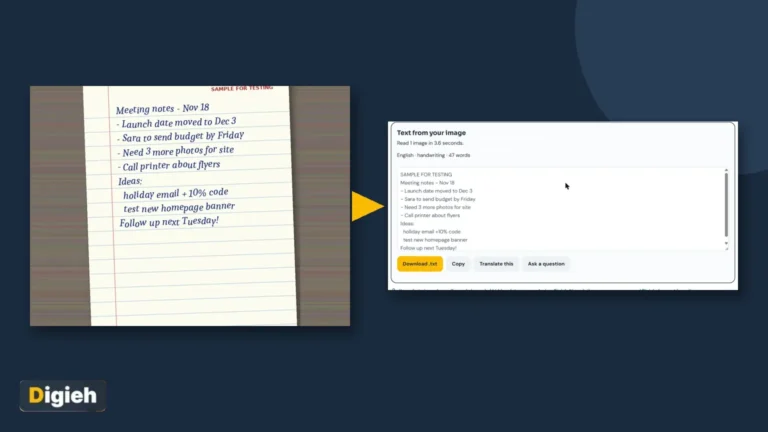
Artlume is a free tool from Digieh that works in any browser, on phones and computers. It reads printed text, handwriting and dozens of languages.
- Open Artlume.
- Drop an image in, paste a screenshot with Ctrl and V, or take a photo with your phone.
- Pick Copy text and choose plain text, line breaks, code or math.
- Tap Copy the text, then copy it or download a text file.
Words that are hard to read are marked with a question mark in brackets. That way you know exactly which words to check.
You get 10 free images a day with no sign-up. Digieh Pro raises this to 200 a day and reads up to 20 images at once.
Tested step-by-step guides: table photo to Excel, receipt to spreadsheet, business card to contact, translate a menu from a photo and handwritten notes to text.
Free updates
Join the Digieh list
Be the first to know when our weekly brief launches.
No spam. Unsubscribe anytime. Read our Privacy Policy.
Turn Tables, Cards and Receipts Into Files
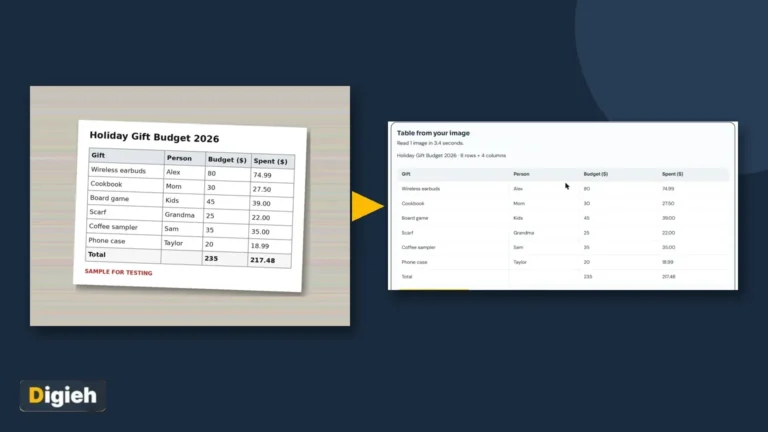
Copying a table as plain text usually breaks the columns. Artlume has separate jobs for this kind of image.
Table to Excel
Pick Table to Excel and download a spreadsheet file. It opens in Excel, Google Sheets and Numbers with every row lined up.
Business cards
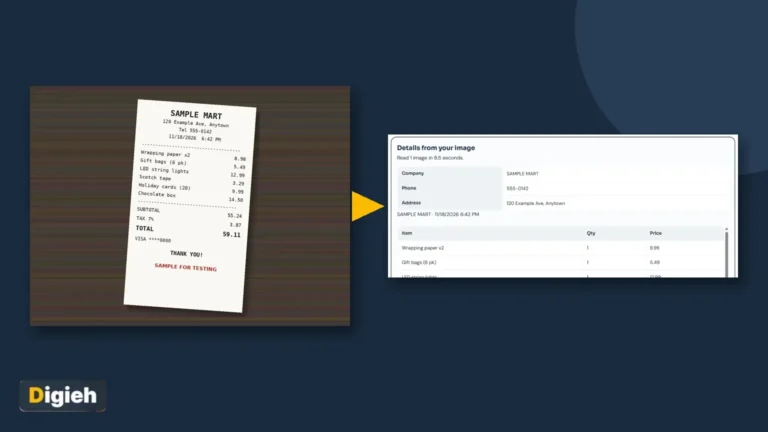
Pick Card or receipt to save a business card as a phone contact. The name, phone, email and website go straight into your contacts.
Receipts
A receipt becomes a spreadsheet of items and prices. Artlume also adds up the items and warns you if they do not match the total.
Translate and explain
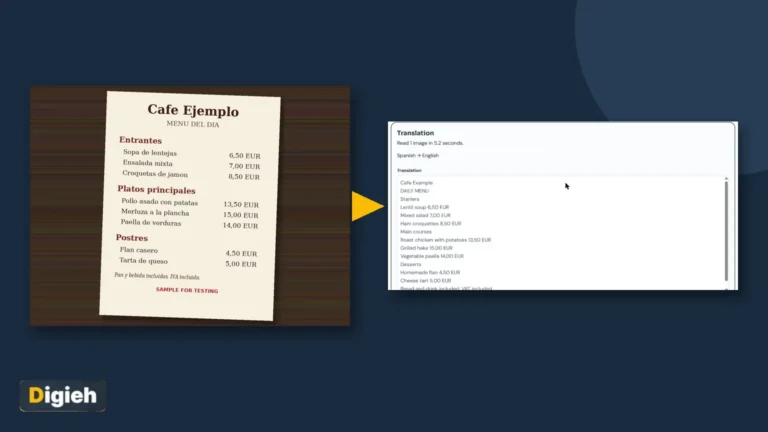
Translate reads a sign or menu and translates it into the language you pick. Explain image turns a chart or meme into plain words.
Get Sharper Results Every Time
- Hold the camera straight above the page, not at an angle.
- Use bright, even light and avoid shadows across the text.
- Fill the frame with the text you need.
- Crop very long pages into two images.
- Zoom in on small print before you take the photo.
- Check names, numbers and prices after you copy them.
What to Do When the Text Comes Out Wrong
Wrong letters usually mean the tool could not see the image clearly. Fix the photo first, then try again.
- Retake the photo in better light, with the page flat and straight.
- Crop away busy backgrounds, borders and other text you do not need.
- Rotate the image so the text reads left to right, or right to left for Urdu and Arabic.
- For a table, use a table tool instead of plain text so columns stay together.
- For two languages on one page, copy the text first, then translate it in a second step.
Numbers deserve a second look. A 1 can turn into an l, and a 0 into an O. Always check phone numbers, prices and dates.
Keep Your Images Private
Many free online converters upload your image to their server. Think twice before you upload bank statements, identity cards or medical papers.
Snipping Tool reads text on your computer. Artlume makes your photo smaller and removes hidden location data on your device first. Digieh does not keep your images.
Before you share any photo, you can also clean it with Cleanlume. For scanned documents saved as a PDF, use the Paperlume tool for scanned PDFs instead.
Try this today. Take a photo of a printed page near you and copy its text with your phone. Then try the same photo in Artlume and compare.
Test Yourself
Which Windows app can copy text from a screenshot?
- Paint
- Snipping Tool
- Calculator
The Snipping Tool has a Text actions button that finds and copies text in a snip.
Frequently Asked Questions
How do I copy text from a picture on my phone?
On iPhone, touch and hold the text in Photos with Live Text. On Android, open the photo in Google Photos and tap Google Lens.
Can Windows copy text from a screenshot?
Yes. Open the snip in the Snipping Tool, select Text actions, then copy the words you need.
Can I copy handwriting from an image?
Built-in tools sometimes read neat handwriting. Artlume reads most clear handwriting and marks words it is unsure about.
How do I turn a picture of a table into Excel?
Use Table to Excel in Artlume and download the spreadsheet file. It keeps each row and column in place.
Conclusion
Your phone or computer can already copy clear text from images for free. For handwriting, tables, receipts and other languages, Artlume saves you from retyping.
Your next step is to try it on one photo you would otherwise type out by hand.
Editor’s Note
This article is accurate as of November 20, 2026. Steps come from Apple Support, Google Photos Help and Microsoft Support. Artlume details come from the Artlume page on Digieh.
Spot an error in this article? Please contact us at support@digieh.com or read our Corrections Policy.
Keep exploring
Your next read is waiting
 1NewsWill the Grid Hold This Winter? NERC Explained5 min read
 2CarsEngine Oil Guide: Which Type Your Car Needs7 min read
 3TechnologyDo I Need a VPN: Honest Home Guide5 min read
 4Food & LifestyleSourdough Starter From Scratch: Day by Day Guide7 min read
 5Pets & AnimalsDog Years Calculator: Your Dog’s Age by Size7 min read
 6MarketingGoogle Business Profile Setup: Get Found Locally Free7 min read
Found this useful?