TRENDING
How to Take Product Photos That Actually Sell

4 min read
Last updated November 15, 2026
Good product photos sell more online. Shoot them with a phone and size them for Etsy, Shopify and eBay. Then clean up every image with free browser tools.
Key Takeaways
- A phone, a window and a sheet of white paper are enough to start.
- Etsy suggests photos at least 2,000 pixels on the shortest side.
- Shopify suggests 2,048 by 2,048 pixel square images.
- eBay requires at least 500 pixels on the longest side and bans added text.
Why Product Photos Matter So Much
Online shoppers cannot touch your item. The photo has to answer their questions about size, color and quality.
Clear photos also build trust. A blurry or dark photo makes even a great product look cheap.
Good to know. Your first photo works like a shop window. Make it the clearest, brightest shot of the whole item.
What You Need to Start
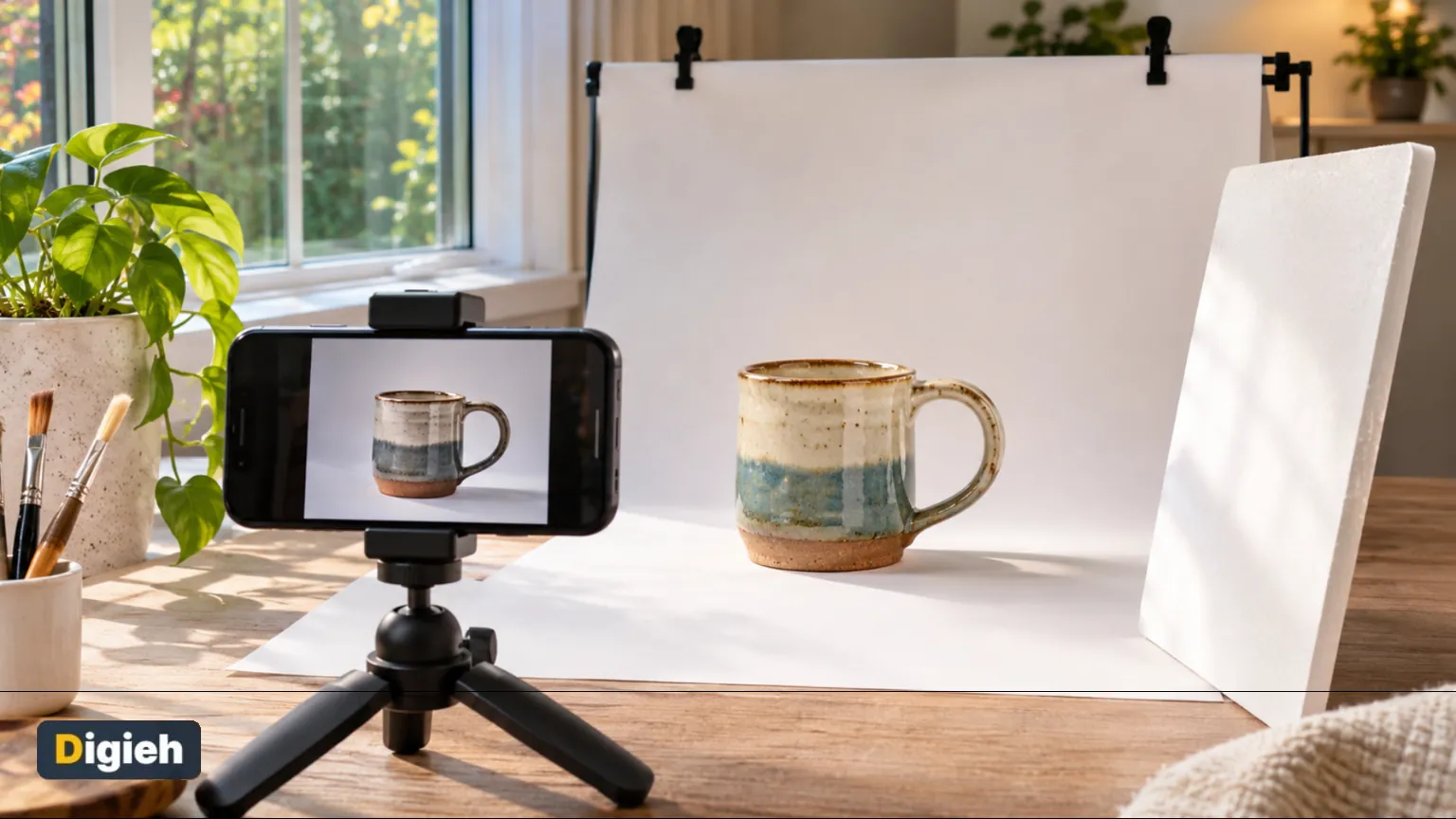
You do not need a fancy camera. Most phones made in the last few years take sharp product photos.
- A phone with a clean lens
- A window with soft daylight
- A large sheet of white paper or poster board
- A piece of white foam board to bounce light
- A small tripod or a stack of books
How to Shoot Product Photos With a Phone
- Wipe your phone lens with a soft cloth.
- Set the product near a window, but out of direct sun.
- Curve white paper behind and under the item, so there is no hard line.
- Hold a white board on the dark side to soften shadows.
- Turn off the flash and tap the screen to focus on the item.
- Shoot from several angles, including one close-up of details.
Take more photos than you need. It is easier to pick the best one later than to set up again.
The Right Photo Size for Each Platform
Each marketplace has its own rules. We put the official guidance side by side.
| Platform | Size guidance | Key rule |
|---|---|---|
| Etsy | Shortest side 2,000 pixels | Square crops show in shop pages |
| Shopify | 2,048 by 2,048 pixels | Files under 20 megabytes |
| eBay | At least 500 pixels on the longest side | No borders, text or watermarks |
Sources are Etsy’s photo update, Shopify’s help center and eBay’s picture policy.
2,048 pxThe square image size Shopify suggests for product photos, according to Shopify’s help center.
How do you take your product photos now?
- With my phone
- With a camera
- I hire a photographer
- Not sure
Free updates
Join the Digieh list
Be the first to know when our weekly brief launches.
No spam. Unsubscribe anytime. Read our Privacy Policy.
Clean Up Your Photos With Free Tools
Once you have your shots, a few quick edits make them shop-ready. You can do all of it in your browser for free.
Remove the Background
A plain white background helps the product stand out. Our free artificial intelligence (AI) background remover cuts the item out right on your device.
Shrink the File Size
Big files slow down your listings. Etsy suggests keeping each photo under 1 megabyte for faster uploads. Our free image compressor shrinks photos without changing how they look.
Remove Hidden Location Data
Phone photos can store the place where you took them. Remove that data with our free photo metadata remover before you upload from home.
Write Alt Text
Alt text describes your image for blind shoppers and search engines. Our free alt text generator writes it from your photo.
Common Product Photo Mistakes
- Avoid flash, which causes glare
- Keep the background plain and clean
- Show the item from more than one angle
- Add a photo that shows the real size
- Never use stock photos for used items
- Check that colors match the real product
Selling on Etsy? Read our breakdown of Etsy fees so your prices cover every cost. You can also learn more about how to write alt text.
Try this today. Reshoot your weakest listing photo next to a window with white paper behind it. Compare the old and new shots side by side.
Test Yourself
What light works best for product photos at home?
- Direct midday sun
- Soft window light
- Your phone flash
Soft window light shows true color without harsh shadows or glare.
Frequently Asked Questions
What is the best background for product photos?
A plain white or light gray background works for most items. It keeps the focus on the product and suits every marketplace.
Can I take product photos with my phone?
Yes. Use soft window light, turn off the flash and keep the phone steady on a tripod or stack of books.
What size should Etsy product photos be?
Etsy suggests at least 2,000 pixels on the shortest side and square-friendly framing.
Can I add text to my eBay photos?
No. eBay bans added borders, text and watermarks on listing photos.
Found this useful?
Editor’s Note
This guide is accurate as of November 15, 2026. Marketplace photo rules can change, so check each platform’s help page before you upload.
Spot an error in this article? Please contact us at support@digieh.com or read our Corrections Policy.
Keep exploring
Your next read is waiting
 1Science & DiscoveriesSpaceX Catches Starship From Orbit in Historic First4 min read
 2MedicinesHydrocortisone Cream Uses: What It Treats and Avoids9 min read
 3Fruits & VegetablesGrapes Health Benefits: Red, Green and Black Compared9 min read
 4CarsBYD’s Denza N8 Arrives With a Massive Range4 min read
 5EcommerceSmart Ways to Start an Online Store Cheaply4 min read
 6MarketingEasy Steps to Write a Social Media Bio8 min read