TRENDING
How to Make a Quiz: Step by Step
Learn how to make a quiz in seven clear steps, with question writing tips from teaching centres, a real tested example and a free quiz maker to try now.

9 min read
Last updated November 24, 2026
To make a quiz, pick one small topic, write clear questions, add believable wrong answers and check every answer key. Then print it or share it online.
This guide gives seven simple steps, question writing advice from university teaching centres and a real tested example.
Key Takeaways.
- Start with one small topic and one goal. A short quiz on one idea beats a long quiz on everything.
- Each question should test one thing, in plain words.
- Wrong answers must look believable, and the right answer should not stand out.
- Check every answer key before anyone takes the quiz.
- Try the quiz on one person first, then print it or share a link.
Jump to a section
- What makes a good quiz
- Seven steps to make a quiz
- How to write clear questions
- A real example from our test
- Make it faster with Quizlume
- Print it or share it online
- Common mistakes
- Test yourself
- Frequently Asked Questions
What Makes a Good Quiz?
A good quiz checks what matters and nothing else. It has a clear goal, plain questions and a correct answer key. People who know the topic can find the right answer, and people who do not cannot guess it.
Baylor University gives teachers one line that sums it up in its tips for multiple choice tests.
Write questions to measure course objectives, not trivia
So before you write anything, finish this sentence. After this quiz, I will know if the person can do this one thing.
Next, pick the question type that fits the goal. This table shows the common types and when each one works best.
| Question type | Best for | Example |
|---|---|---|
| Multiple choice | Facts, ideas and quick checks | Which gas do plants take in? |
| True or false | Fast checks of one clear statement | The Sun is a star. |
| Checkboxes | Questions with more than one right answer | Which of these are mammals? |
| Fill in the blank | Key words and spelling | The largest ocean is the ____ Ocean. |
| Number | Sums and counting | How many legs does a spider have? |
| Order list | Steps and timelines | Put the planets in order from the Sun. |
| Matching | Pairs such as countries and capitals | Match each country with its capital. |
| Essay | Explaining an idea in your own words | Explain the water cycle. |
7steps take you from a blank page to a finished quiz
How Do You Make a Quiz in Seven Steps?
Pick a topic, set the length and draft the questions. Then tidy the wording, write the wrong answers, check the key and test it. Each step takes a few minutes. Most of the quality comes from steps four to six.
1. Pick one small topic and one goal
Choose a topic you can cover in ten questions or fewer. The water cycle works. All of science does not. Write the goal in one line and keep it in front of you.
2. Choose the length and the level
Five to ten questions is enough for a class check or a family game. Think about who will take it. A quiz for a ten year old needs short words and one idea per question.
3. Draft more questions than you need
Write quick, rough questions first. Aim for a few extra, because some will turn out weak. You can write them yourself or let a quiz maker draft them from your topic or notes.
4. Make every question clear
Read each question on its own. If a clever student could argue about what it means, rewrite it. Cut any words that do not help.
5. Write believable wrong answers
A wrong answer should be a mistake a real learner might make. Silly options give the answer away. Keep all options about the same length and style.
6. Check the answer key
Answer every question yourself without looking at the key. Then compare. If your answer and the key differ, one of them is wrong.
7. Test it on one person, then share it
Ask one friend or colleague to take the quiz. Watch where they stop or frown. Fix those questions, then print the quiz or send the link.
Try this today. Take a quiz you already use and answer it without the key. Count how many answers you would now argue with.
How Do You Write Clear Questions?
Ask one thing per question, in positive words, with three to five answer choices. Keep the options similar in length. Avoid trick wording, and avoid options such as all of the above.
The University of Waterloo teaching centre has a helpful guide to designing multiple choice questions. It says three choices work about as well as four or five. Good wrong answers are hard to write, so three strong options beat five weak ones.
The same guide warns against negative wording. Even well prepared students often misread a question that asks which option is not true.
| Do this | Avoid this |
|---|---|
| Ask one clear thing | Two questions hidden in one |
| Use plain, positive wording | Questions built around the word not |
| Give three to five options | Padding with silly options |
| Keep options a similar length | A right answer that is much longer |
| Use mistakes real learners make | All of the above and none of the above |
| Mix the position of the right answer | Putting the right answer in the same place |
Why use multiple choice at all? The University of Melbourne has an introductory guide to them. It notes that they can be marked reliably and without a marking guide.
Good to know. Words such as always and never are a giveaway. Test takers learn to rule those options out.
What Does a Real Example Look Like?
Here is a real run from start to finish. Tested on November 24, 2026 on the live Quizlume quiz and test maker. We typed one small topic and changed nothing else.
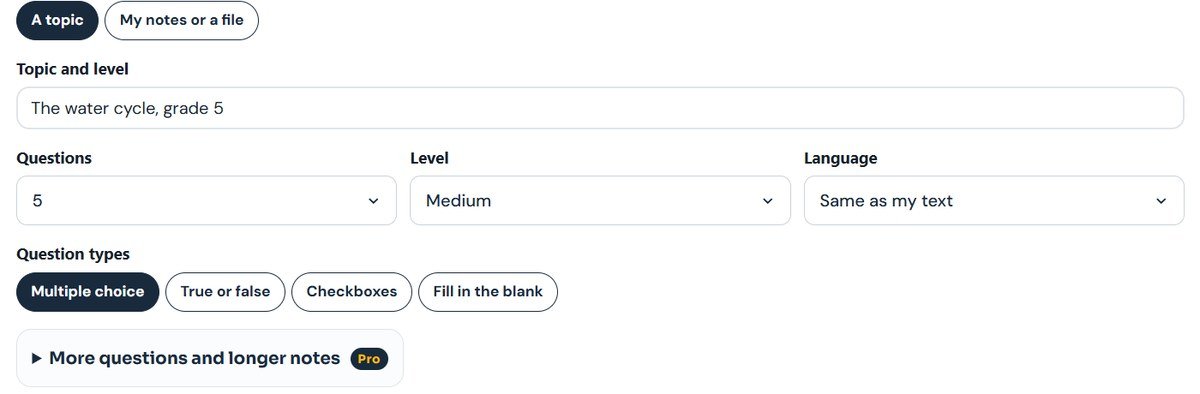
The tool wrote five questions in about six seconds. A second pass then answered each question without seeing the key. Every key matched, so each question shows a green verified label.
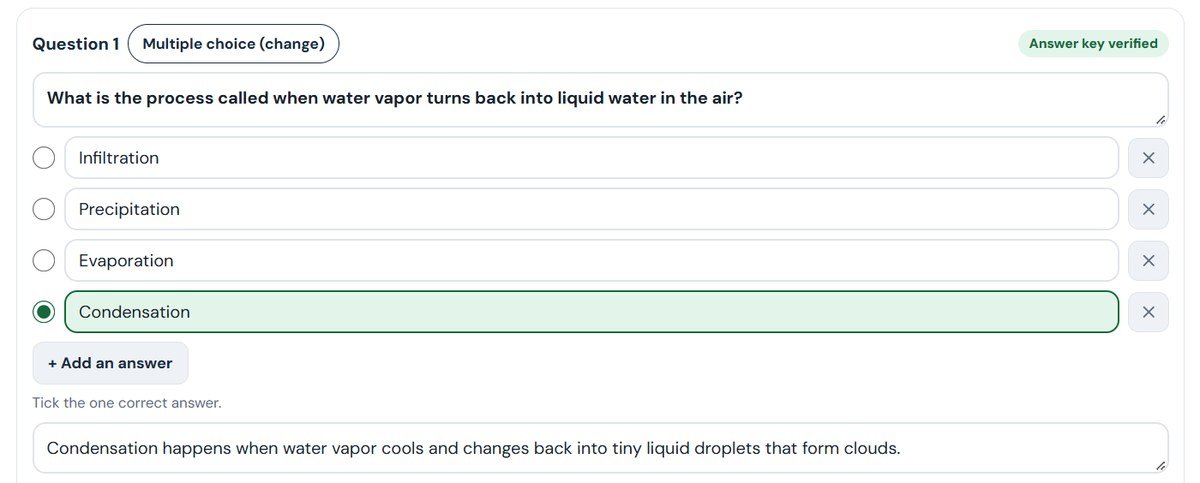
We ran more tests the same day. These are the measured results.
| Test | Questions | Time | Keys verified |
|---|---|---|---|
| Multiple choice from a topic | 5 | 6.4 seconds | 5 of 5 |
| True or false from a topic | 5 | 11.4 seconds | 5 of 5 |
| Mixed types, hard level | 10 | 14.5 seconds | 10 of 10 |
| From pasted class notes | 5 | 6.8 seconds | 5 of 5 |
Source: Digieh test runs on the live Quizlume tool, November 24, 2026.
Why does the second check matter? In our own six-topic test, it flagged five questions. Four had a wrong answer key and one was unclear. Three of those wrong keys were in a set of ten algebra questions.
The lesson holds for quizzes you write by hand too. A first draft often has a wrong key, so step six is not optional.
Free updates
Join the Digieh list
Be the first to know when our weekly brief launches.
No spam. Unsubscribe anytime. Read our Privacy Policy.
How Can You Make a Quiz Faster With Quizlume?
Type a topic, paste your notes or upload a file, and Digieh AI drafts the questions. Each answer key is checked a second time. You then edit anything you like and print, download or share the quiz.
- Open the Quizlume quiz and test maker.
- Type one small topic with the level, such as The water cycle, grade 5. You can also paste notes or upload a Word or PDF file.
- Pick the number of questions, the level and the question types.
- Tap the button and read every question. Fix any question marked for checking.
- Add your own questions if you like. There are eleven question types.
- Print it, download a Word file, or sign in to share it online.
You can try it without an account. That gives two quizzes a day with up to five questions each. You can also skip the writing help and type or paste your own questions.
Studying for your own exam? Our guide on how to use chatbots to study shows how to turn notes into practice questions.
What will you make a quiz for?
- A class or lesson
- Exam revision
- A family or party game
- Not sure
Should You Print the Quiz or Share It Online?
Print it when everyone is in one room and you want no screens. Share it online when people are in different places or you want it marked for you. Many teachers do both with the same quiz.
| Way to give the quiz | Good for | What you get |
|---|---|---|
| Printed paper | Classrooms and exams | Name line, answer key page, three versions with a different order |
| Word file | Editing and school templates | A file you can change and print later |
| Online link | Homework and remote groups | Automatic marking, scores for each person, optional time limit and pass mark |
| Quiz video | Social posts and class warm ups | Each question with a countdown, then the answer |
For a printed test, hand out different versions to students who sit side by side. For an online quiz, decide if people should see the correct answers afterwards.
Planning a term of revision? Pair your quizzes with a plan from our guide on how to make a study timetable.
What Are the Common Mistakes?
Most weak quizzes fail in the same few ways. Check yours against this list before you share it.
- Too many questions for the time people have.
- A question that tests two things at once.
- One option that is much longer or more exact than the others.
- Trick wording that tests reading, not knowledge.
- An answer key nobody checked.
- No trial run with a real person.
Writing the instructions too? Our guide on making your writing sound natural helps keep them short and clear.
Test Yourself
How many answer choices does a good multiple choice question need?
- At least six
- Three to five
- Exactly two
Three to five is enough. Three strong options work about as well as four or five.
Frequently Asked Questions
How many questions should a quiz have?
Five to ten questions suit most class checks and games. Use more only when people have the time and the topic needs it.
What is the easiest way to make a quiz?
Start from one small topic or your own notes and let a quiz maker draft the questions. Then read and fix each one yourself.
Can I make a quiz without an account?
Yes. Quizlume lets you make, edit, print and download a quiz without signing in. An account is only needed to save quizzes and share them online.
How do I stop students copying from each other?
Print two or three versions with the questions and answers in a different order. Online, set a time limit.
Where can I find more free tools?
See every tool on our free online tools page.
Editor’s Note
This article is accurate as of November 24, 2026. Tool limits and features may change, so check the Quizlume page for the latest. University guidance was read on the same date.
Spot an error in this article? Please contact us at support@digieh.com or read our Corrections Policy.
Keep exploring
Your next read is waiting
 1Pets & AnimalsDog Vomiting: Causes, Home Care and Vet Signs7 min read
 2TechnologyCV Format by Country: How Rules Change Abroad7 min read
 3AI & TechGoogle Homepage Redesign: AI Chats Replace Search Button4 min read
 4HealthGout Attack: Causes, Trigger Foods and Fast Relief7 min read
 5NewsCOP31 Ends Without Deal: What Happened in Antalya4 min read
 6Finance & MarketsThe World’s 10 Biggest IPOs in History, Ranked5 min read
Found this useful?