TRENDING
Humanize AI Text: Make Your Writing Sound Natural
Learn how to humanize AI text in seven steps, with a real before and after example, a fact check list and a free tool that keeps your numbers the same.


9 min read
Last updated November 24, 2026
To humanize artificial intelligence (AI) text, change its rhythm, cut its stock phrases and add real detail. Keep every fact exactly as it was.
This guide shows the steps by hand, then a real before and after example. The example comes from our own test, with the numbers measured.
Key Takeaways.
- Chatbot drafts sound flat because the sentences are all one length and the same words keep coming back.
- Mix short and long sentences, and never start two sentences in a row the same way.
- Cut filler lines and stock linking words that add nothing.
- Add one real detail of your own, such as an example from your work.
- Never let a rewrite change your numbers, names or quotes.
Jump to a section
- Why chatbot text sounds flat
- Seven steps to humanize a draft
- A real before and after
- Do it faster with Humanlume
- Why a detector score is the wrong goal
- Keep your facts safe
- Match the tone to the reader
- Common mistakes
- Test yourself
- Frequently Asked Questions
Why Does Chatbot Text Sound Flat?
A chatbot predicts likely words, so its drafts lean on safe, common patterns. Readers notice the pattern long before they notice any single word.
Purdue University explains the main problem well in its guide to sentence variety.
Too many sentences with the same structure and length can grow monotonous for readers.
Here are the signs to look for in your own draft.
| Sign | What it looks like | Quick fix |
|---|---|---|
| Even rhythm | Every sentence runs to about the same length | Put a short sentence next to a long one |
| Stock openers | Lines that warm up before saying anything | Delete the opener and start with the point |
| Linking words everywhere | Moreover, furthermore and additionally in every paragraph | Keep one only where the logic needs it |
| Lists of three | Three neat items in sentence after sentence | Use two items, or four, or just one strong one |
| Inflated words | Big words where a plain one would do | Pick the word you would say out loud |
| Tidy endings | Each paragraph closes with a summary line | Stop when the point is made |
Source: the Purdue Online Writing Lab, the United States government plain language guide and the patterns Humanlume measures.
How to Humanize Artificial Intelligence (AI) Text in Seven Steps
You can do all of this by hand in about ten minutes for a short piece. Work through the steps in order.
1. Read it out loud once
Your ear catches what your eye skips. Mark every place where you run out of breath or your voice goes flat.
2. Break the rhythm
Find three sentences in a row with a similar length. Cut one down to five or six words, or join two of them.
The Purdue guide suggests alternating short and long sentences. It also suggests changing how sentences open.
3. Change the openings
Look at the first word of each sentence. If two neighbors start the same way, rewrite one of them.
4. Cut the filler
Delete lines that only announce what is coming. Phrases about how important something is rarely add anything.
The government plain language guide gives a simple rule. Express only one idea in each sentence.
5. Swap the inflated words
Chatbots love a small set of grand words. Replace each one with the plain word a friend would use.
- Change “leverage” to “use”.
- Change “navigate the challenges” to “deal with the problems”.
- Change “plays a pivotal role” to “matters”.
- Change “a wide range of” to “many”.
6. Add one real detail
This step matters most, and no tool can do it for you. Add something only you know.
It can be a number from your own work, a short example or an honest opinion. One real detail changes the whole piece.
7. Check your facts again
Compare every number, name and quote with your first draft. A rewrite that changes a fact has made your text worse, not better.
150 wordsAbout the longest a paragraph should run, says the United States government plain language guide.
A Real Example, Before and After
We ran a short sample through our own tool to show what these steps do. Tested on November 24, 2026, on the live Humanlume page.
The sample is a typical chatbot paragraph about remote work. It has 125 words, one survey figure and one year.
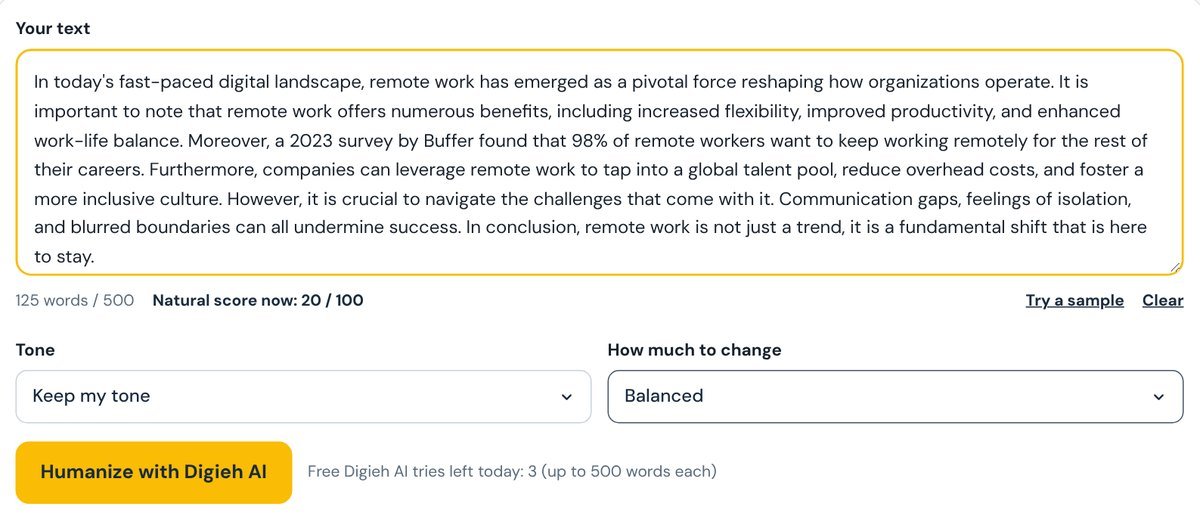
We left the tone on Keep my tone and the strength on Balanced. The rewrite took about three seconds.
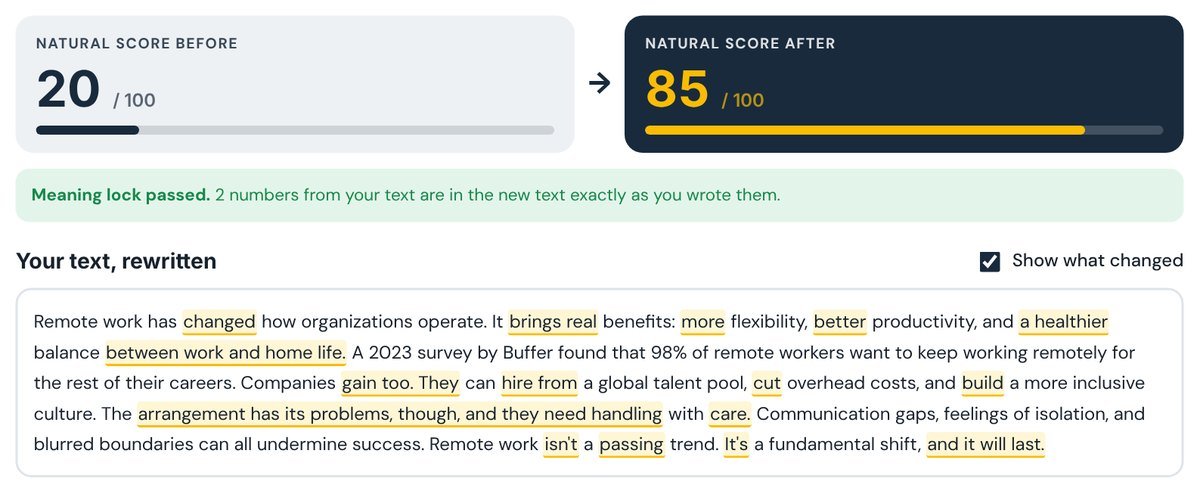
Here is what the tool measured before and after.
| What we measured | Before | After |
|---|---|---|
| Natural score out of 100 | 20 | 85 |
| Sentence length | Even, 12 to 23 words | Varied, 3 to 22 words |
| Overused words | 8 | 0 |
| Stock linking words | 2 | 0 |
| Filler lines | 5 | 0 |
| Reading ease, higher is easier | 38 | 60 |
| Words | 125 | 104 |
Source: our own test run in Humanlume on November 24, 2026. Your wording will differ a little each time.
Notice what did not change. The year 2023 and the figure of 98% are both still there, written the same way.
We also ran 11 sample texts that day, some over 300 words long. Every number, name and quote stayed in place in all 11 results.
Good to know. The Natural score is our own measure of how a text reads. It is not a detector result and it promises nothing about one.
Do It Faster With Humanlume
The hand method works, but it takes time on long pieces. Our Humanlume text humanizer does steps two to five for you.
- Paste your text. The Natural score of your draft shows right away.
- Pick a tone. Keep your own, or choose casual, professional, academic or simple English.
- Choose how much to change, from a light polish to a full rewrite.
- Tap the button. Digieh AI rewrites the text, and every number, name and quote is compared with your original.
- Read the result with each change marked, then copy it or download it.
You get 3 free tries a day with no sign-up, up to 500 words each. That covers most emails, posts and short essays.
Longer text is a Pro feature that uses credits. A Digieh AI key handles up to 10,000 words at a time.
Pro also adds Write like me. Paste a sample of your own writing and the rewrite follows your rhythm and word choice.
The tool never adds spelling mistakes to look human. Some tools do, and it only makes your writing look careless.
What do you mostly write with a chatbot?
- Emails and messages
- School or study work
- Blog or social posts
- Not sure
Free updates
Join the Digieh list
Be the first to know when our weekly brief launches.
No spam. Unsubscribe anytime. Read our Privacy Policy.
Why Is a Detector Score the Wrong Goal?
Many people humanize text only to change a detector result. That is a weak goal, because detectors disagree with each other and make mistakes.
Stanford researchers tested seven detectors on essays written by real students. The essays came from the Test of English as a Foreign Language (TOEFL).
61%The share of 91 human-written student essays that detectors labeled as machine-written, according to Stanford researchers.
All seven detectors agreed on 18 of the 91 essays. A person wrote every one of them. At least one detector flagged 89 of the 91.
Senior author James Zou described the detectors in four words in the Stanford report.
unreliable and easily gamed
So a score from one checker tells you little. Write for your reader instead, and the text improves either way.
Important. Follow the rules of your school or workplace on using chatbots. If the rules ask you to say that you used one, say so.
How Do You Keep Your Facts Safe While Editing?
Rewriting is risky for facts. A smoother sentence is worthless if the figure inside it is now wrong.
- List every number, date and name in your draft before you start.
- Keep quotes word for word, and keep who said them.
- Do not let “any” become “most”, or “will” become “may”.
- Check links and citations still point to the same source.
- Compare the list with the final text before you send it.
Humanlume runs this comparison for you after every rewrite. If an item is missing, it rewrites again or tells you which item changed.
Writing an important email? Our guide on how to write a professional email covers structure and tone.
Which Tone Should You Choose?
Natural does not mean casual. A legal note and a text to a friend can both sound human, in different ways.
| Tone | Use it for | What changes |
|---|---|---|
| Keep my tone | Most writing | Only the rhythm and the stock phrases |
| Casual | Messages and social posts | Contractions and friendlier words |
| Professional | Work emails and reports | Clear, direct sentences |
| Academic | Essays and papers | No contractions, citations kept |
| Simple English | Readers still learning English | Short sentences and common words |
Source: the tone options in Humanlume, checked November 24, 2026.
For a profile or a job application, keep it professional but warm. Our LinkedIn profile tips show the balance.
Building a CV for another country? The free CVlume CV Builder formats it the local way.
Common Mistakes When You Humanize Text
| Mistake | Better choice |
|---|---|
| Adding spelling errors on purpose | Keep grammar correct and change the rhythm instead |
| Swapping every word for a synonym | Change the sentence shape, not just the words |
| Making the text much longer | Cut filler so the piece gets shorter |
| Trusting one detector score | Read it out loud and judge it as a reader |
| Inventing a personal story | Add a detail that is really yours, or leave it out |
| Skipping the fact check | Compare numbers, names and quotes with the original |
The fifth mistake matters more than it looks. A made-up experience can cost you trust, a grade or a job.
Try this today. Take the last thing a chatbot wrote for you. Read it out loud, then cut the first sentence and see if anything is lost.
Test Yourself
Which change makes a chatbot draft sound most natural?
- Adding a few spelling mistakes
- Mixing short and long sentences
- Using longer words
Varied sentence length gives writing rhythm. Mistakes and long words only make it harder to read.
Frequently Asked Questions
Is it OK to humanize chatbot text?
Editing a draft so it reads well is normal writing work. Always follow the rules of your school or employer about chatbot use.
Will humanized text pass a detector?
Nobody can promise that. Detectors give different results for the same text, and they also flag writing by real people.
Does Humanlume change my numbers or quotes?
No. Each rewrite is compared with your original, and the tool tells you if any number, name or quote changed.
How long can my text be?
Free tries take up to 500 words each. With a Digieh AI key you can run up to 10,000 words at a time.
Where can I find more free tools?
See every tool on our free online tools page.
Editor’s Note
This article is accurate as of November 24, 2026. Detector figures come from Stanford research published in 2023. Tool limits and features may change, so check the Humanlume page for the latest.
Spot an error in this article? Please contact us at support@digieh.com or read our Corrections Policy.
Keep exploring
Your next read is waiting
 1HealthType 2 Diabetes Symptoms: Early Warning Signs Explained7 min read
 2TechnologyHow to Make a Boomerang GIF From Video7 min read
 3NewsCOP31 Ends Without Deal: What Happened in Antalya4 min read
 4Finance & MarketsChase Vendor Data Breach: What Customers Should Do4 min read
 5AI & TechGoogle Homepage Redesign: AI Chats Replace Search Button4 min read
 6SportsVerstappen Wins 2026 Las Vegas Grand Prix: Results4 min read
Found this useful?