TRENDING
How to Make a Reaction GIF in Minutes
How to make a reaction GIF: pick the right two seconds, crop it square, add a short caption and one sticker. Real test results, caption tips and safety advice.


7 min read
Last updated November 21, 2026
To make a reaction GIF, cut a 2 to 3 second moment, crop it square and add a short caption. One sticker adds feeling without clutter.
We followed this recipe on November 21, 2026 with our free tool. The result was a 593 KB square GIF, made in 2.9 seconds.
Key Takeaways.
- The best reaction GIFs are 2 to 3 seconds of one clear moment.
- A square crop looks clean in chats and on phones.
- Keep captions to two or three words in a bold style.
- Our test GIF was 360 by 360 pixels, 45 frames and 593 KB.
- Avoid fast flashing, which can trigger seizures for some people.
Jump to a section
- The reaction GIF recipe
- Step by step in our free tool
- What our test showed
- Writing a caption that lands
- Moments that make great reactions
- Speed and direction tricks
- GIF or MP4 for reactions
- Build a personal reaction kit
- Where to share reactions
- Make it safe for everyone
- Common mistakes
- Frequently asked questions
- Conclusion
The Reaction GIF Recipe
| Part | What to choose | Why |
|---|---|---|
| Moment | 2 to 3 seconds of one action | Short loops read instantly |
| Crop | Square 1:1 | Fits chat bubbles and phones |
| Size | 480 pixel setting | Small file, still sharp |
| Caption | 2 or 3 words, bold | Readable at a glance |
| Sticker | One emoji in a corner | Adds feeling, keeps focus |
| Format | GIF, or MP4 for chat apps | Plays almost anywhere |
Recipe based on options in the Digieh Video to GIF tool and our November 21, 2026 test.
This recipe works for almost any clip. Change one part at a time once you get the hang of it.
Step by Step in Our Free Tool
- Open our free Video to GIF tool in your browser.
- Choose your video, or tap Try our sample video.
- Set the start and end around your moment. We used 1.0 to 4.0 seconds.
- Under Size and motion, set Crop to Square 1:1.
- In Add text, type your caption. Pick Meme style, Large, White and Bottom.
- In the sticker step, pick an emoji such as Laughing and place it top right.
- Tap Make my GIF, check the preview, then Download GIF.
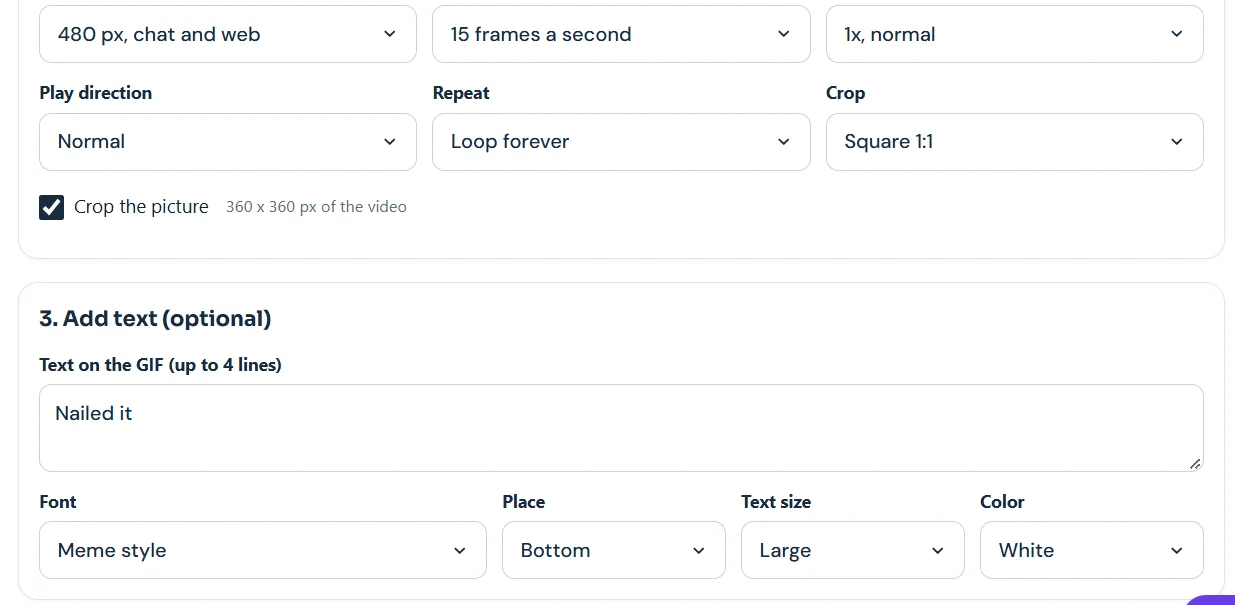
The tool shows the cropped size as you go. Our square crop came out at 360 by 360 pixels from the sample video.
What Our Test Showed
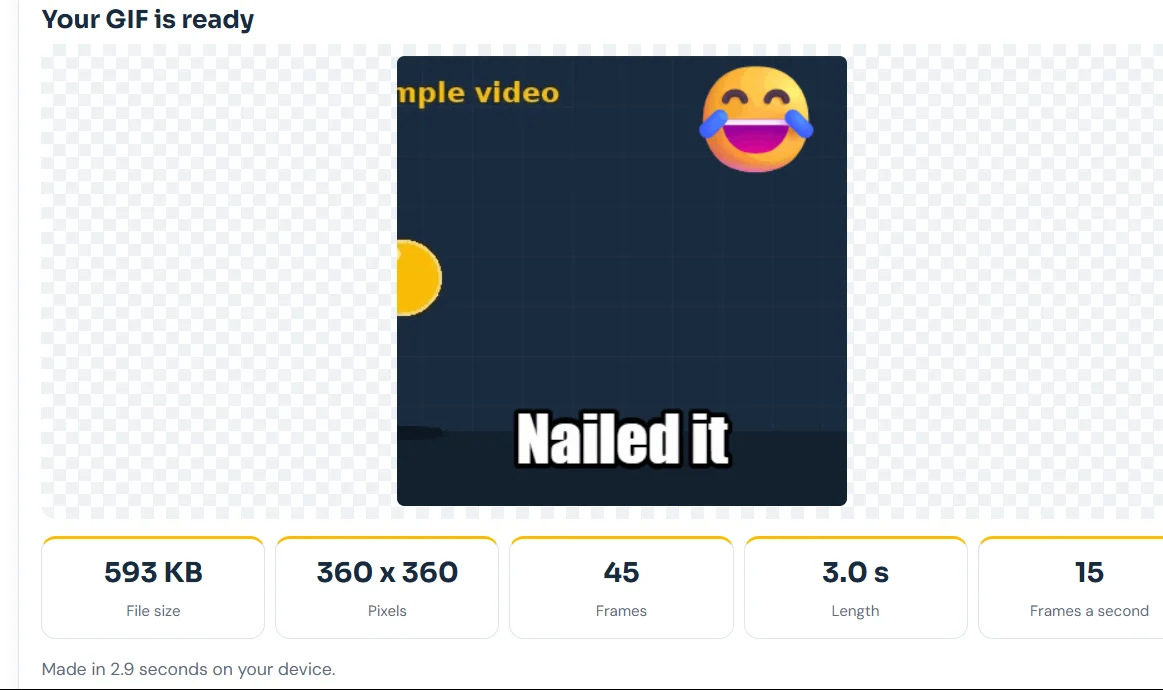
| Measure | Result |
|---|---|
| File size | 593 KB |
| Pixels | 360 x 360 |
| Frames | 45 |
| Length | 3.0 seconds |
| Time to make | 2.9 seconds |
Source: Digieh test on the Video to GIF tool, November 21, 2026. Sample video, 15 frames a second, laptop browser.
593 KBSize of our 3-second square reaction GIF with a caption and sticker. Source: Digieh tool test.
That size sends quickly in any chat app. It sits far below the 20 MB free upload limit on Discord, per Discord Support.
Writing a Caption That Lands
- Keep it to two or three words, like Nailed it or Not today.
- Match the caption to the face or action, not the other way around.
- Use the Meme style font for jokes and Classic serif for something calm.
- Put text at the bottom so it does not cover faces.
- Use White text on dark clips and Black on bright ones.
Captions do the heavy lifting in a reaction GIF. A plain clip becomes a reply the moment you add the right two words.
Which caption style do you like most?
- Meme style
- Handwritten
- Typewriter
- Not sure
Moments That Make Great Reactions
- A slow nod or a dramatic eye roll.
- A pet tilting its head.
- A thumbs-up or a slow clap.
- A surprised jump or a double take.
- A victory dance after a win.
- A shrug for when you have no answer.
Clips you film yourself are the safest choice. You know the people in them, and you own the moment.
Use your own clips
Record short reactions with friends or pets on purpose. Act out common replies like yes, no, wow and thank you.
Then build a small set of personal reaction GIFs you can reuse for months.
Good light makes a big difference. Film near a window or under a bright lamp, and hold the phone steady so the loop looks clean. A plain background keeps the focus on the face or action.
Speed and Direction Tricks
| Setting | Effect | Good for |
|---|---|---|
| 0.5x slow motion | Stretches the moment | Dramatic eye rolls and slow claps |
| 1.5x or 2x | Speeds it up | Funny, frantic energy |
| Reverse | Plays backward | Rewind jokes, like a drink going back in the glass |
| Boomerang | Forward then back | Smooth loops that never jump |
Source: speed and play direction options in the Digieh Video to GIF tool, checked November 21, 2026.
Slow motion adds frames, so the file grows. If size matters, pair slow motion with a shorter section.
GIF or MP4 for Reactions?
In a separate test with the same sample clip, a 6-second GIF was 936 KB. The same clip saved as MP4 was only 51 KB.
Use GIF when you want it to work almost everywhere, including email and GIF favorites. Use MP4 when you send in chat apps that play short videos on a loop.
Source: Digieh tests on the Video to GIF tool, November 21, 2026.
Free updates
Join the Digieh list
Be the first to know when our weekly brief launches.
No spam. Unsubscribe anytime. Read our Privacy Policy.
Build a Personal Reaction Kit
A small set of your own reactions covers most chats. Record each one once, then reuse it.
- Yes, a nod or thumbs-up.
- No, a head shake.
- Wow, a surprised face.
- Thank you, a small bow.
- That is funny, a big laugh with the Laughing sticker.
- On my way, a wave at the door.
- Good night, a stretch or yawn.
- Congrats, a slow clap.
Name the files clearly, like reaction-yes.gif, so you can find them fast. Keep the kit in one folder on your phone.
Making reactions on your phone
You can open the tool in your phone’s browser too. Record a clip, open it in the tool and follow the same steps.
The file lands in your downloads, ready to send. Short clips finish in a few seconds.
Where to Share Reactions
| Where | Tip |
|---|---|
| Under six seconds can send as a GIF, per the Help Center | |
| Discord | Free uploads up to 20 MB |
| Slack and work chat | Keep it small and friendly |
| Use a small GIF under 2 MB |
Sources: WhatsApp Help Center, Discord Support and the Email preset in our tool.
For app-specific steps, see our guides on GIFs for WhatsApp and GIFs for Discord.
Make It Safe for Everyone
Avoid clips with fast flashing lights or strobes. Web accessibility guidelines say content should not flash more than three times in any one second, per the W3C.
The W3C notes that flashing content can cause migraines, dizziness, nausea and seizures. A calm reaction is just as funny.
Add clear captions too. They help people who view GIFs with sound off, which is every GIF.
Write short alt text when you post a GIF on a website or social app. One sentence describing the action helps people using screen readers.
Common Mistakes
| Mistake | Fix |
|---|---|
| Clip too long | Cut to 2 or 3 seconds |
| Caption too long | Use two or three words |
| Text covers the face | Move it to the bottom |
| Too many stickers | Use just one |
| File too big | Use 320 or 480 pixels, or MP4 |
Based on settings in the Digieh Video to GIF tool. GIF uses at most 256 colors per palette, per MDN.
Want a loop that plays forward and back? Try our boomerang GIF guide.
Try this today. Make three reaction GIFs from one clip today: one for yes, one for no and one for wow.
Posting your reaction on a website? Learn how to convert MP4 to animated WebP for smaller files.
Test Yourself
What crop works best for most reaction GIFs?
- Wide 16:9
- Square 1:1
- Story 9:16
A square crop fits chat bubbles and phone screens cleanly.
Frequently Asked Questions
How do you make your own reaction GIF?
Cut a 2 to 3 second moment, crop it square, add a short caption and save it as a GIF.
How long should a reaction GIF be?
Two to three seconds is ideal. It loops quickly and keeps the file small.
What makes a good reaction GIF?
One clear emotion, a readable caption and a loop that feels natural.
Conclusion
A great reaction GIF is short, square and captioned with a few strong words. Our test made one in under three seconds at 593 KB.
Your next step is to open the tool, pick your best two seconds and type a two-word caption.
Editor’s Note
This article is accurate as of November 21, 2026. File sizes come from a Digieh test on our Video to GIF tool on November 21, 2026. Accessibility guidance comes from the W3C. App limits come from WhatsApp and Discord support pages.
Spot an error in this article? Please contact us at support@digieh.com or read our Corrections Policy.
Keep exploring
Your next read is waiting
 1Food & LifestyleWhy You Get Static Shocks in Winter, Fixed8 min read
 2AI & TechCanva AI Off Switch: Hide Generative Tools Fast4 min read
 3HealthBlood Pressure in Winter: Why It Goes Up7 min read
 4TechnologyBusiness Card to Contact: Save Cards From Photos7 min read
 5Pets & AnimalsCat Years Calculator: How Old Is Your Cat?7 min read
 6NewsSchool Phone Bans: What Two New Studies Found5 min read
Found this useful?