TRENDING
How to Make QR Code Labels for Shops
Make free QR and barcode labels for your pharmacy, mart or shop. Choose the right code, print from a CSV on any sheet, and add expiry and batch details.

7 min read
Last updated November 22, 2026
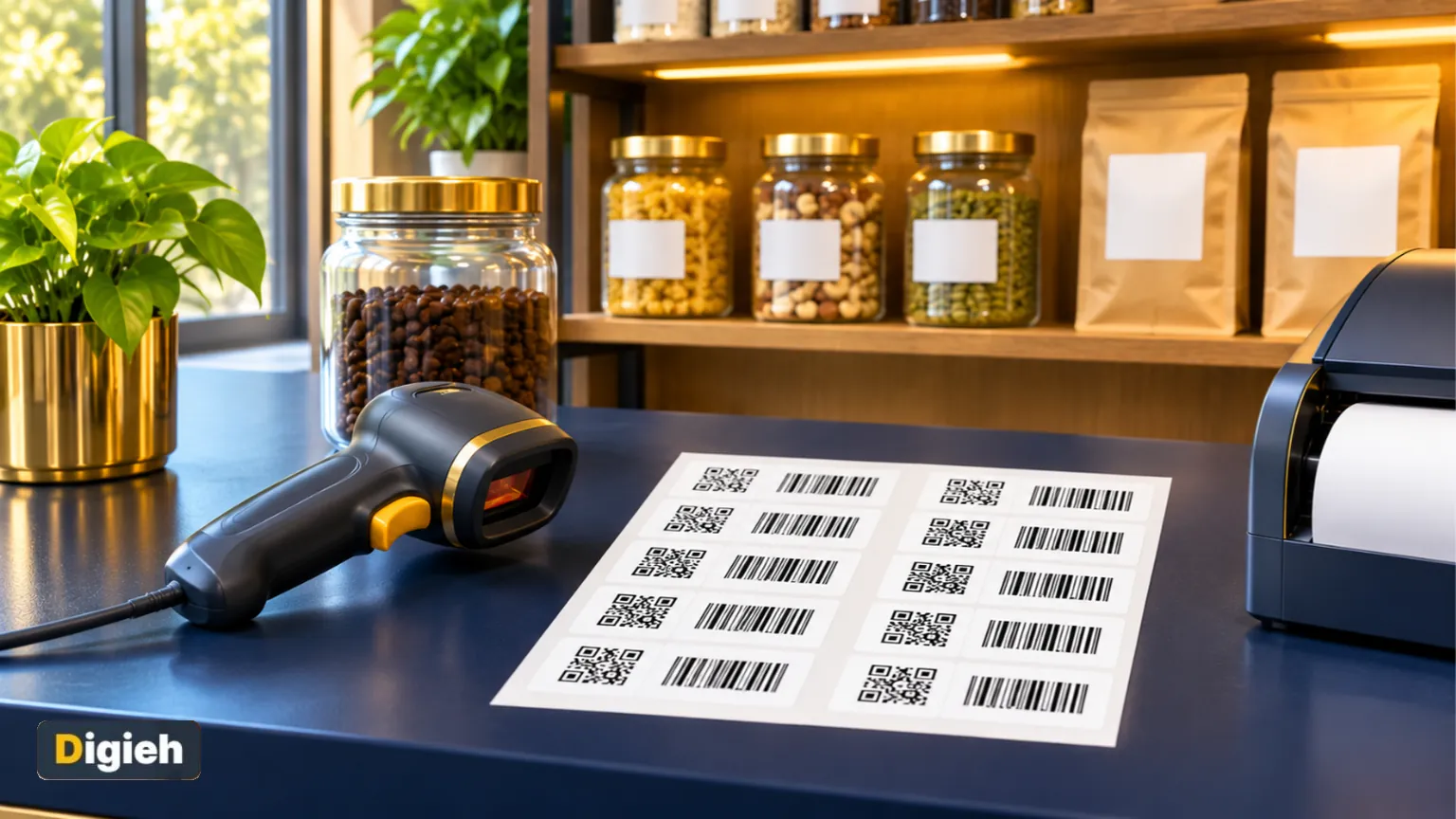
Loose medicine strips, homemade snacks and repacked spices often have no barcode at all. That slows down billing and makes stock checks harder.
You can fix this with printed labels that your billing scanner can read. This guide shows how small pharmacies, marts and cash and carry stores can make them for free.
Key Takeaways.
- You can print scanner-ready QR or barcode labels from a simple item list or spreadsheet.
- Pick the code type your billing scanner reads, such as QR, Code 128 or EAN-13.
- Add expiry and batch details on the label so staff can spot old stock fast.
- Always test-print one sheet and scan it with two devices before printing hundreds.
- A dynamic QR code lets you change the link later without reprinting.
Jump to a section
- Why shop labels matter
- Which code type to choose
- Make labels step by step
- Pick the right label sheet
- Built-in safety checks
- Dynamic QR codes for links that change
- Example from a small mart
- Extra care for pharmacy labels
- Tips for labels that always scan
- Frequently Asked Questions
Why Shop Labels Matter
A barcode on every item means faster billing and fewer price mistakes. It also makes it easy to count stock and find items close to expiry.
Big brands print codes on their packs. Small shops that repack, make their own goods or sell loose items often need their own labels.
Retail is also moving toward 2D codes. GS1 is the group behind retail barcodes. It describes a goal of one 2D barcode that works at checkout and online.
11Barcode and QR types you can print on Digieh product labels, from QR to ITF-14.
Which Code Type to Choose
The right code depends on what your scanner reads and what you want the code to do.
| Code type | Best for | Scanner needed |
|---|---|---|
| QR code | Item code, product details or a link | Camera or 2D scanner |
| Code 128 | Your own item codes for billing | Most laser and 2D scanners |
| EAN-13 or UPC-A | Items that already have a registered product number | Most laser and 2D scanners |
| GS1 DataMatrix | Product number plus expiry and batch, in a small space | 2D scanner |
| GS1-128 | Product number, expiry and batch as a long barcode | Most laser and 2D scanners |
| ITF-14 | Outer cartons and cases | Most laser and 2D scanners |
Source: GS1 Digital Link, the GS1 2D in retail guideline and the Digieh QR Code Maker. Checked November 22, 2026.
Good to know. Older laser scanners cannot read QR codes or DataMatrix. If yours is a laser model, choose Code 128 for your own item codes.
What kind of scanner does your shop use?
- Laser scanner
- Camera or 2D scanner
- Phone app only
- Not sure
Make Labels Step by Step
Our free QR Code Maker has a Product labels mode built for small stores. Here is how to use it.
- Open the tool and choose Product labels.
- Type your items into the table, or upload a CSV file from your stock software. A sample CSV is included.
- The tool matches your columns, such as name, price, pack size, batch, expiry and barcode.
- Choose what the code holds: an item code for your billing scanner, product details text, or a GS1 Digital Link.
- Pick the code on the label, such as QR, Code 128, EAN-13 or GS1 DataMatrix.
- Choose a label style and a sheet size, then print a test page.
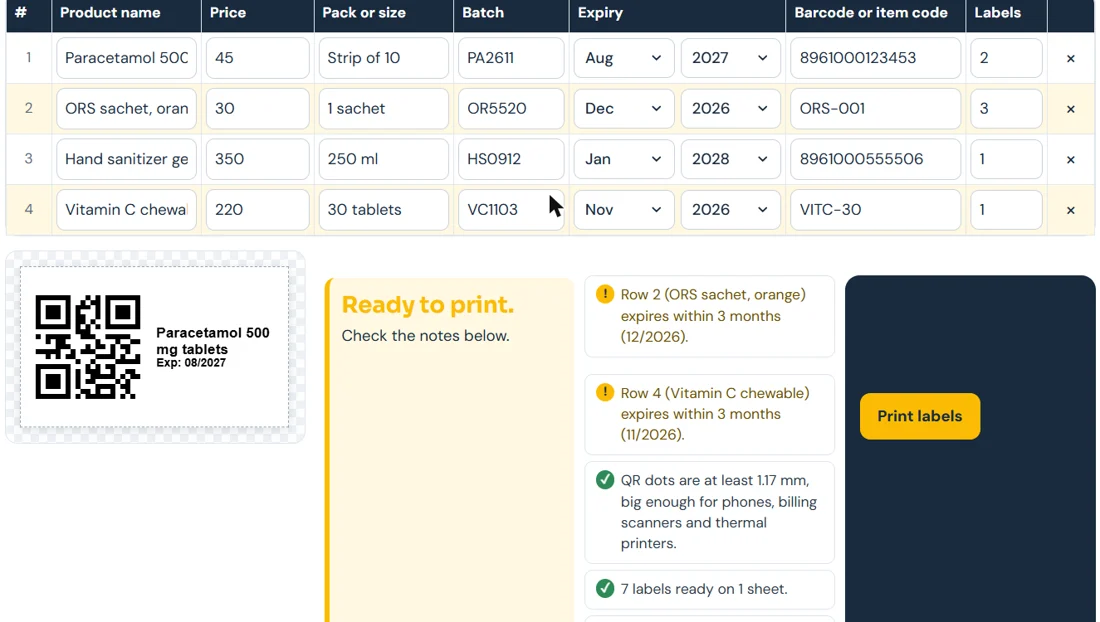
Pick a label style
- Name and code: the item name, expiry and code. This is the default.
- Full shelf label: adds the store name and price.
- Code only: a bigger code, like the barcodes on branded packs. Best for very small labels.
Try this today. Start with the sample CSV in the tool. Replace the sample rows with five real items. Print one test sheet before you do your whole stock.
Pick the Right Label Sheet
Label paper comes in many layouts. The tool supports common ones and a custom size.
| Sheet | Labels per sheet | Good for |
|---|---|---|
| A4 | 21, 24, 40 or 65 | Office printers, shelf and item labels |
| US Letter | 30 | Office printers in North America |
| Thermal roll 50 x 30 mm | 1 per label | Label printers at the counter |
| Thermal roll 40 x 30 mm | 1 per label | Smaller items |
| Thermal roll 38 x 25 mm | 1 per label | Medicine strips and small packs |
| Custom | Your own size | Any other label paper |
Source: label sheet options in the Digieh QR Code Maker.
Half-used sheet? You can skip used labels so printing starts at the next free spot. You can also nudge the layout if your printer prints slightly off.
Built-In Safety Checks
Mistakes on labels cost money. The tool checks your list before you print.
- Expiry: flags items that are already expired or expire within 3 months.
- Duplicate codes: warns if two items share the same code.
- Typos in product numbers: checks the last digit of EAN and UPC numbers.
- Print size: warns if the code dots or bars are too small to scan well.
For EAN and UPC barcodes, the tool checks the minimum bar width from the GS1 rules. This helps codes scan at the first try.
Free updates
Join the Digieh list
Be the first to know when our weekly brief launches.
No spam. Unsubscribe anytime. Read our Privacy Policy.
Dynamic QR Codes for Links That Change
A normal QR code holds its link forever. That is great, until your menu, price list or offer page changes.
A dynamic QR code points to a short link that you can edit later. The printed code stays the same.
In the QR Code Maker, “Dynamic link (Pro)” costs 10 credits once per code. Editing the link afterward is free, and you get 30 days of scan counts.
You can also pause a code at any time. Normal codes made with the tool are free and never expire.
GS1 makes the same point for packaging: brand owners can change linked content without changing the code on the pack.
Which code should you choose if your shop has an older laser scanner?
- Code 128
- QR code
- GS1 DataMatrix
Laser scanners read 1D barcodes like Code 128. QR codes and DataMatrix need a camera or 2D scanner.
A Simple Example From a Small Mart
Say a small mart repacks rice, lentils and spices into 1 kg bags. None of the bags has a barcode.
- The owner lists each item with a short code, such as RICE1KG, plus name, price and pack size.
- In the tool, the code holds the item code, and the label shows Code 128 for the laser scanner.
- The owner picks Full shelf label so the price shows, and an A4 sheet with 24 labels.
- After a test print and scan, the owner prints the full sheet and sticks labels on each bag.
- The same item codes are added to the billing software, so each scan rings up the right price.
The whole job takes minutes once the list is ready. Next month, the owner only uploads the updated list.
Extra Care for Pharmacy Labels
Pharmacies deal with batches and expiry dates every day. A clear label helps staff and protects patients.
- Print the expiry on its own bold line, so it is never cut off.
- Add the batch number to labels for medicines you repack or split.
- Use the Name and code style on small strips, so the text stays readable.
- Keep the original pack details, such as the leaflet, with the stock.
A label never replaces the medicine’s own packaging information. Patients should still read the product leaflet or pharmacy label for use and warnings.
The expiry check flags items that run out within 3 months. Move those to the front of the shelf or set them aside for return.
Tips for Labels That Always Scan
- Print dark codes on a light background. Light codes on dark paper often fail.
- Keep the white space around the code, called the quiet zone.
- Do not shrink codes to fit a tiny label. Use Code only style instead.
- Use good label paper. Shiny tape over a code can cause glare.
- Scan a test sheet with two different devices before printing many.
GS1 UK design guidelines also stress clear space and strong contrast around QR codes on products.
Other Things You Can Make
The same tool makes everyday QR codes too. It offers 11 code types, including website links, WiFi, contact cards, WhatsApp chats, events and locations.
You can add your logo and a frame, such as “Scan for menu”. Selling online as well? Compare platforms in our Shopify vs Etsy guide.
Frequently Asked Questions
Can I make barcode labels for my shop for free?
Yes. The Product labels mode in the Digieh QR Code Maker is free. Only dynamic QR codes use credits.
Will my billing scanner read the labels?
Most scanners read Code 128 and EAN-13. 2D and camera scanners also read QR and DataMatrix. Always test one sheet first.
Do QR codes expire?
Normal QR codes do not expire, because the content is inside the code. Dynamic codes depend on the short link staying active.
Where can I find more free tools?
See every tool on our free online tools page. Pharmacy staff may also like our guide on how to read a drug facts label.
Editor’s Note
This article is accurate as of November 22, 2026. Barcode standards come from GS1. Label options and checks come from the Digieh QR Code Maker. Test your printer and scanner before printing in bulk.
Spot an error in this article? Please contact us at support@digieh.com or read our Corrections Policy.
Keep exploring
Your next read is waiting
 1HealthLower Back Pain: Causes, Home Care, Red Flags7 min read
 2TechnologyHow to Convert MP4 to Animated WebP, Tested7 min read
 3Pets & AnimalsDog Vomiting: Causes, Home Care and Vet Signs7 min read
 4NewsVerstappen Wins 2026 Las Vegas Grand Prix: Results4 min read
 5AI & TechHow to Turn Off AI in Everyday Apps7 min read
 6Finance & MarketsThe World’s 10 Biggest IPOs in History, Ranked5 min read
Found this useful?