TRENDING
Translate Menu From Photo: Free Steps for Travelers
Translate a menu from a photo for free: we tested a Spanish menu into English, with real results, tricky menu words, allergy tips and an offline backup plan.

7 min read
Last updated November 20, 2026
To translate a menu from a photo, snap the menu and open Artlume. Choose Translate, type your language and tap Read and translate. You get the full menu in your language, line by line, with prices kept.
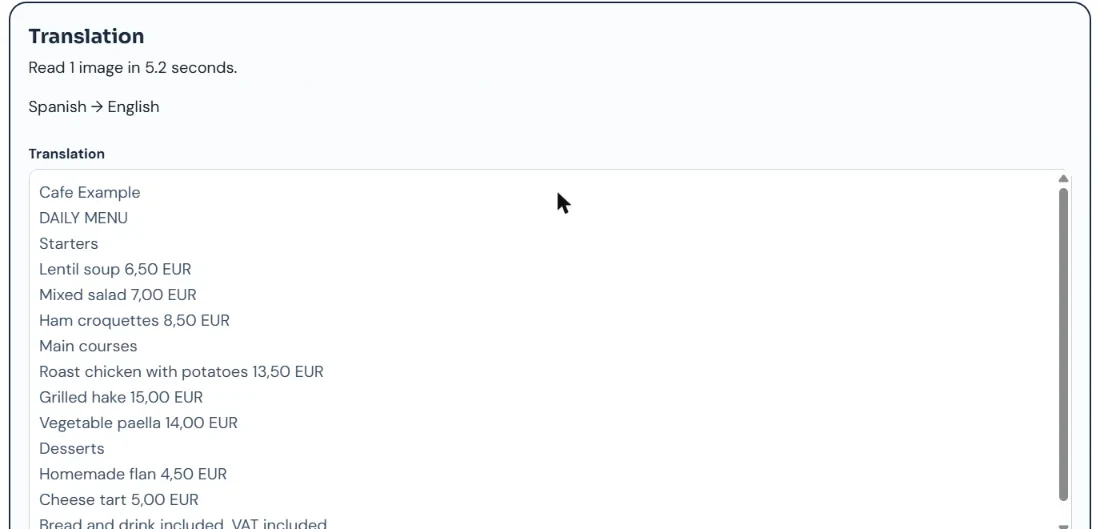
We tested it on a sample Spanish lunch menu. Every dish, section heading and price came back in clear English in about five seconds.
Key Takeaways.
- Artlume translates a whole menu photo and keeps the original text beside it.
- Our Spanish sample came back fully and correctly in English in 5.2 seconds.
- Prices and the order of dishes stay the same, so you can point at the menu.
- A translation cannot confirm allergens, so always ask staff directly.
- Download your languages in a phone translation app as an offline backup.
Jump to a section
- Our test result
- Step-by-step guide
- Menu words that trip travelers up
- Allergies and diets
- Photo tips in restaurants
- Offline backup
- Other free ways
- Privacy and limits
- Frequently asked questions
- Conclusion
Our Test: A Sample Spanish Menu
TestedTested on November 20, 2026 with Artlume in Translate mode. Our sample image was read in 5.2 seconds on the free plan.
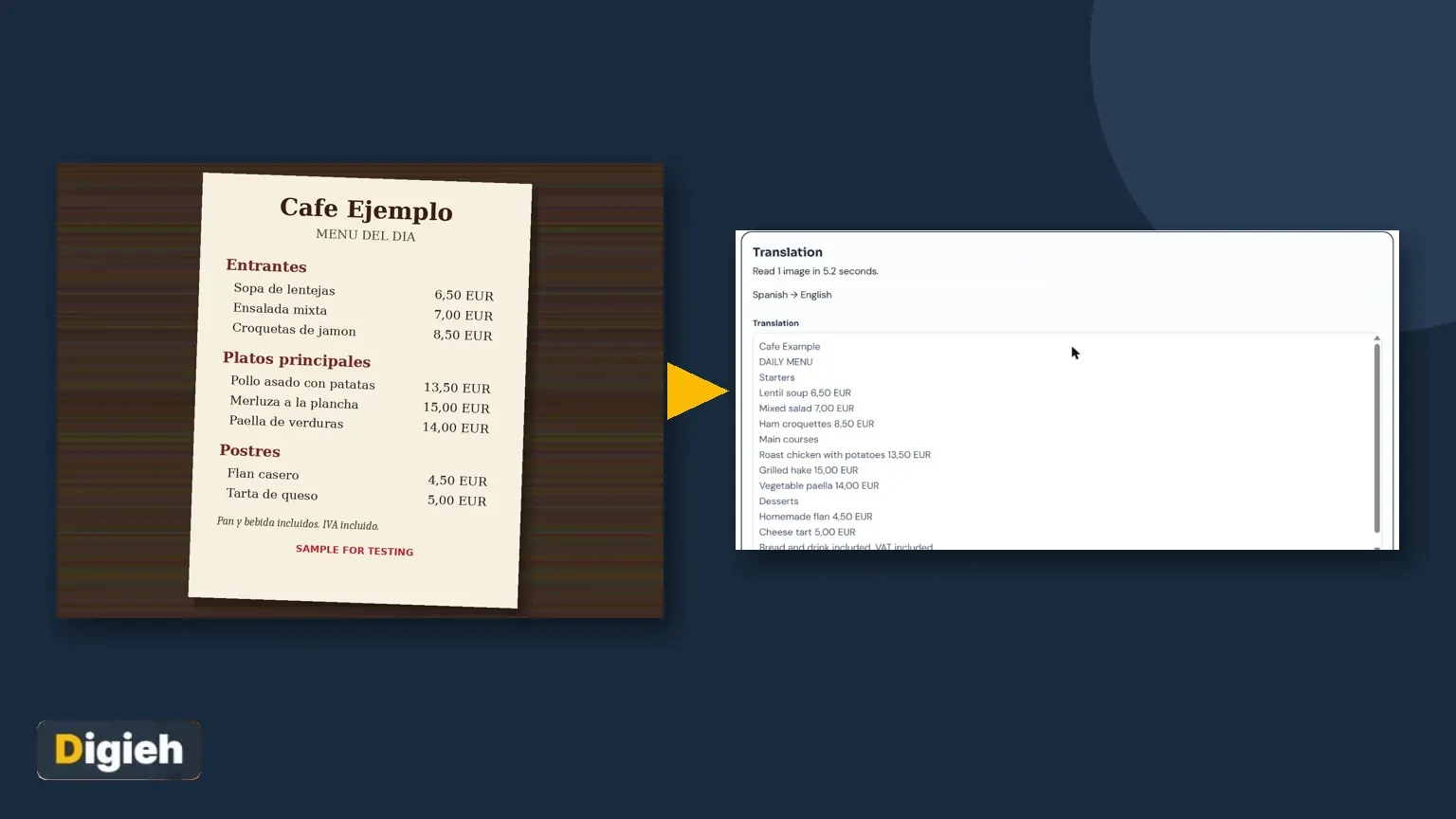
We made a sample menu of the day for a made-up cafe. It has starters, mains, desserts and a note about extras. Here is the photo we used.

Artlume detected Spanish on its own and translated into English. It showed the translation first and kept the original text in a second box.
| Spanish on the menu | Artlume English | Correct? |
|---|---|---|
| Sopa de lentejas | Lentil soup | Yes |
| Croquetas de jamon | Ham croquettes | Yes |
| Pollo asado con patatas | Roast chicken with potatoes | Yes |
| Merluza a la plancha | Grilled hake | Yes |
| Flan casero | Homemade flan | Yes |
| Pan y bebida incluidos | Bread and drink included | Yes |
Source: Digieh test on November 20, 2026, using the Artlume image to text tool.
Prices kept their local format, with a comma before the cents. That is normal in much of Europe, where 13,50 means thirteen euros and fifty cents.
Step-by-Step: Translate a Menu From a Photo
- Take a sharp photo of the menu page, or the board on the wall.
- Open Artlume in your phone browser.
- Add the photo, or tap Take a photo.
- Choose the Translate tile.
- Check the Translate into box. Type your language if it is not already set.
- Tap Read and translate.
- Read the translation and scroll to compare with the original text.
- Tap Copy or Download .txt to keep it for later.
You can also tap Ask a question after the translation. Try questions like which dishes have no meat, or which item is the cheapest main.
Tip for groups. Paste the translation into your group chat. Everyone can choose before the server comes back.
Menu Words That Trip Travelers Up
Some menu terms do not translate well word by word. Knowing a few helps you read the translation with more confidence.
| Term you may see | What it usually means |
|---|---|
| Menu del dia (Spain) | A fixed-price lunch with several courses |
| Plat du jour (France) | Dish of the day |
| Coperto (Italy) | Cover charge per person |
| A la plancha | Cooked on a flat grill |
| Casero, fait maison | Homemade |
| Market price, or S.Q. | Price depends on the day, so ask |
Source: Digieh traveler notes. Our Artlume test confirmed the Spanish terms above. See the Artlume tool.
If a translation sounds odd, it may be a local dish name. Ask the server or search the original name for a photo.
How do you usually order when you cannot read the menu?
- Translation app
- Point at photos
- Ask the server
- Not sure
Allergies and Special Diets
A translated menu shows dish names, not full recipes. Hidden nuts, milk, egg or wheat are often not listed at all.
- Always tell staff about a serious allergy in person.
- Carry a printed allergy card in the local language.
- Ask about cooking oil and shared fryers.
- Do not rely on a translation alone for a life-threatening allergy.
The Food and Drug Administration (FDA) explains common food allergens and why labels matter. Abroad, rules and labels can differ, so ask every time.
You can use Artlume to translate an allergy card you write in English. Then double-check the result with a native speaker or your hotel.
Photo Tips in Restaurants
- Turn off the flash on laminated menus to avoid glare.
- Photograph one page at a time, filling the frame.
- For wall boards, step back and hold the phone level.
- Use the restaurant lights, or ask to move to a brighter table.
- Retake if any price looks blurry.
Chalkboard menus with handwriting are harder. Artlume reads handwriting, but a closer, straighter photo helps a lot.
Free updates
Join the Digieh list
Be the first to know when our weekly brief launches.
No spam. Unsubscribe anytime. Read our Privacy Policy.
Set Up an Offline Backup
Artlume needs an internet connection. Before you fly, set up an offline option in case you have no signal.
In the Google Translate app, you can download languages. After that, camera translation works without internet, says Google Translate Help.
Planning a trip? Our guide to translation apps for travel compares the main options.
Other Free Ways to Read a Foreign Menu
| Method | Best for | Limits |
|---|---|---|
| Artlume | Full menu with original text and follow-up questions | Needs internet, 10 free images a day |
| Phone camera translation | Quick live view over the menu | Text can jump around, layout is lost |
| iPhone Live Text | Translating one line | Line by line only |
Source: Google Translate Help, the Apple iPhone User Guide and our test.
Live view translation is fun at the table, but the text often shifts as you move. A photo gives you a steady, full list you can read slowly.
For more ways to pull text from pictures, see our pillar guide, how to copy text from any image.
Reading Prices and Extras
Menus abroad often hide small extras in a line at the bottom. The translation makes those lines easy to spot.
| Line on the menu | What it can mean for your bill |
|---|---|
| Bread and drink included | No extra charge for those items |
| Tax included | The price you see is the price you pay |
| Service not included | A tip or service charge may be expected |
| Cover charge per person | A fixed fee added for each diner |
| Supplement or extra | Costs more than the base price |
Source: Digieh traveler notes, checked against our Spanish menu test in the Artlume tool.
Our sample menu said bread, drink and tax were included. Artlume translated that note correctly, so the price shown was the full price.
Tipping customs differ a lot between countries. Check a local guide before you go, and ask if you are unsure.
A Simple Ordering Script
Once you know what you want, a few short phrases go a long way. Translate them with Artlume or your phone before you travel.
- I would like this, please, while pointing at the menu.
- Does this have nuts, milk or wheat?
- Can I have it without meat?
- The bill, please.
- Thank you, it was delicious.
Save the translated phrases as a note on your phone. Show the screen if pronunciation is hard.
Privacy and Limits
Artlume shrinks your photo and removes hidden photo data, such as location, on your device before upload. The page says Digieh does not keep your image after reading it.
The free plan reads 10 images a day with no sign-up. A Digieh Pro key raises that to 200 a day and lets you add up to 20 images at once.
Good habit. Avoid uploading full card numbers, bank details or identity documents to any online tool. Cover them with your finger or crop them out first.
Try this today. Before your next trip, translate one menu photo from the web as practice. You will know the steps when you are hungry.
Test Yourself
What should you never rely on a menu translation for?
- Prices
- Serious allergies
- Dish names
Translations show dish names, not hidden ingredients. Always ask staff about allergies.
Frequently Asked Questions
Can I translate a menu photo for free?
Yes. Artlume translates 10 images a day free with no account.
Which languages does it support?
Many common languages. Type your target language in the Translate into box.
Does it work offline?
No. Use a phone translation app with downloaded languages as an offline backup.
Will it keep the prices?
Yes. In our test, every price stayed the same and in the same order.
Can it read handwritten chalkboards?
Often yes. Take a close, straight photo in good light.
Conclusion
A menu photo and one tap give you the whole menu in your language. Our Spanish sample came back fully correct, with prices intact.
Your next step is to bookmark Artlume on your phone before your next trip.
Editor’s Note
This article is accurate as of November 20, 2026. Test results come from our own run of Artlume on a Digieh sample image marked for testing. Feature details come from the official help pages linked above.
Spot an error in this article? Please contact us at support@digieh.com or read our Corrections Policy.
Keep exploring
Your next read is waiting
 1Pets & AnimalsDog Years Calculator: Your Dog’s Age by Size7 min read
 2AI & TechGoogle Genie 4: How to Build Playable Worlds5 min read
 3CarsTrade-In vs Private Sale Calculator: Which Pays More7 min read
 4NewsWill the Grid Hold This Winter? NERC Explained5 min read
 5Home & KitchenBathroom Mold Removal: Safe Steps That Actually Work7 min read
 6HealthInsomnia Fixes People Say Work, Checked Against Science8 min read
Found this useful?