TRENDING
Handwritten Notes to Text: Digitize Pages in Minutes
Handwritten notes to text, tested: we turned a page of pen notes into typed text word for word. See real results, the right style to pick and photo tips.


7 min read
Last updated November 20, 2026
To turn handwritten notes into text, photograph the page and open Artlume. Choose Copy text, set the style to keep lines, and tap Copy the text. You get typed text you can paste anywhere.
We tested it on a sample page of meeting notes in a slanted, pen-style hand. All nine lines came back word for word, with the bullet points and indents kept.
Key Takeaways.
- Artlume reads handwriting and keeps line breaks when you pick the layout style.
- Our sample page of 47 words came back exactly right in 3.6 seconds.
- Good light and a flat page matter more than neat handwriting.
- You can translate the notes or ask questions about them right after.
- Always skim names, numbers and dates before you share the text.
Jump to a section
- Our test result
- Step-by-step guide
- Which text style to pick
- Photo tips for handwriting
- What to check
- Organize your digital notes
- Ideas for students and teams
- Other free ways
- Privacy and limits
- Frequently asked questions
- Conclusion
Our Test: A Sample Page of Handwritten Notes
TestedTested on November 20, 2026 with Artlume in Copy text mode. Our sample image was read in 3.6 seconds on the free plan.
We made a lined notebook page with meeting notes, bullet points, a percent sign and indented ideas. The writing slants and wobbles like real pen notes.
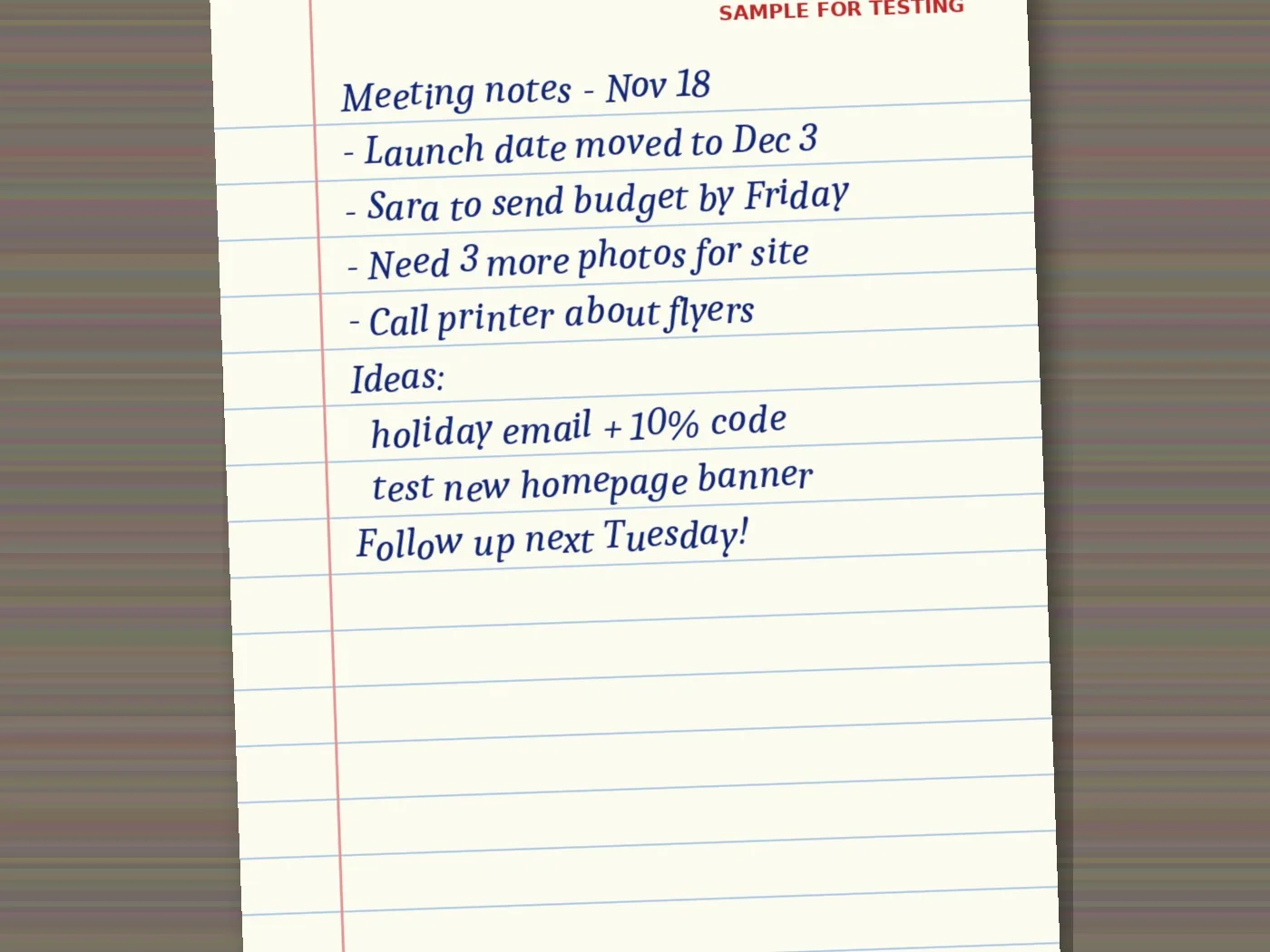
Artlume labeled the result as English handwriting with 47 words. It kept every line on its own row, which is what you want for notes.

| What we checked | On the page | Artlume result |
|---|---|---|
| Heading | Meeting notes – Nov 18 | Correct |
| Bullet points | 4 dashed lines | All 4, dashes kept |
| Numbers | Dec 3, 3 more photos, 10% | All correct |
| Indented ideas | 2 lines | Indents kept |
| Last line | Follow up next Tuesday! | Correct, with the exclamation mark |
| Word count | 47 | 47 |
Source: Digieh test on November 20, 2026, using the Artlume image to text tool.
It also picked up our small red test label at the top of the page. That is a good sign, since it means nothing on the page was skipped.
Step-by-Step: Handwritten Notes to Text
- Lay the page flat in good light.
- Take a straight photo that shows the whole page.
- Open Artlume and add the photo.
- Choose the Copy text tile.
- Set Text style to keep lines and layout.
- Tap Copy the text.
- Skim the result, then tap Copy or Download .txt.
- Paste it into your notes app, email, chat or shared document.
Need it in another language? Tap Translate this after reading. Want a summary or a to-do list? Tap Ask a question and type what you need.
Whole notebook? The free plan reads one page at a time. A Pro key lets you add up to 20 pages at once. You then download all the text as one ZIP file.
Which Text Style to Pick
| Style | What it does | Best for |
|---|---|---|
| Plain text | Joins lines into paragraphs | Letters, essays, journal pages |
| Keep layout | Keeps each line and indent | Notes, lists, recipes |
| Code | Keeps spacing exactly | Code written on a whiteboard |
| Math | Writes formulas in a math format | Homework and equations |
Source: Artlume style options on the Artlume page, tested November 20, 2026.
For meeting notes and lists, keep layout is almost always right. Plain text is better when you wrote full sentences that wrap across lines.
Photo Tips for Handwriting
- Use daylight near a window, or a bright desk lamp.
- Hold the phone straight over the page to avoid slanted lines.
- Flatten notebook pages so the middle does not curve.
- Avoid shadows from your hand or phone.
- Pencil works, but dark pen reads best.
- Crop out the next page if it shows at the edge.
Messy handwriting is less of a problem than you might think. Blur, shadows and curved pages cause far more mistakes than a quick scrawl.
How do you keep your handwritten notes today?
- Notebook only
- Photos on my phone
- Typed into an app
- Not sure
What to Check Before You Share
- Names of people and places, which have no dictionary to guide the reader.
- Numbers, dates and amounts.
- Words you underlined or crossed out.
- Arrows and boxes, which become plain text or are skipped.
- Abbreviations only you understand.
Drawings and diagrams do not turn into text. If your notes include a sketch, keep the original photo alongside the typed version.
Organize Your Digital Notes
Typed notes are only useful if you can find them later. A simple system works better than a complex one.
- Start each note with a date and a short title.
- Keep one folder per class, project or client.
- Paste action items at the top in a short list.
- Keep the original photo in the same folder.
- Search your notes app for keywords instead of scrolling.
Tight on cloud space? Our guide to freeing up cloud storage helps you make room for scanned pages.
Free updates
Join the Digieh list
Be the first to know when our weekly brief launches.
No spam. Unsubscribe anytime. Read our Privacy Policy.
Ideas for Students and Teams
| Who | How handwriting to text helps |
|---|---|
| Students | Turn lecture notes into searchable study guides |
| Teachers | Type up whiteboard plans after class |
| Teams | Share meeting notes in chat within minutes |
| Writers | Turn notebook drafts into editable text |
| Families | Save handwritten recipes from older relatives |
Source: Digieh use cases, tested with the Artlume tool.
Old family recipes are a lovely use. Photograph the card, keep the photo for the handwriting, and save the typed version so it is easy to share.
Other Free Ways to Read Handwriting
| Method | Best for | Limits |
|---|---|---|
| Artlume | Full pages, layout kept, translate or ask after | 10 free images a day |
| iPhone Live Text | Copying a few lines from a photo | Short bits, less layout control |
| Google Lens | Quick copy on Android | Layout often lost |
| OneNote ink to text | Notes written with a stylus | Needs digital ink, not paper |
Source: Apple Support, Google Search Help, Microsoft Support and our test.
Apple says Live Text works with handwriting in photos on supported iPhones. It is quick for a few lines but less handy for a full page.
Our pillar guide, how to copy text from any image, walks through every method in detail.
A Weekly Habit That Sticks
The best system is one you actually keep. A short weekly routine turns a notebook into a searchable archive without much effort.
- Pick one time each week, such as Friday afternoon.
- Photograph every new page from that week.
- Run the pages through Artlume and paste the text into your notes app.
- Add a date and a title to each note.
- Move action items into your calendar or task list.
Ten minutes a week is usually enough for most people, even with a busy schedule. After a month, you will be able to search every meeting, lecture or idea in seconds.
If you share notes with a team, paste them into your chat right after the meeting. People act faster when notes arrive the same day.
Privacy and Limits
Artlume shrinks your photo and removes hidden photo data, such as location, on your device before upload. The page says Digieh does not keep your image after reading it.
The free plan reads 10 images a day with no sign-up. A Digieh Pro key raises that to 200 a day and lets you add up to 20 images at once.
Good habit. Avoid uploading full card numbers, bank details or identity documents to any online tool. Cover them with your finger or crop them out first.
Try this today. Photograph the last page of notes you wrote. Run it through Artlume and paste the text into your notes app.
Test Yourself
Which text style keeps each line and indent of your notes?
- Plain text
- Keep layout
- Math
Keep layout preserves line breaks and indents, which suits notes and lists.
Frequently Asked Questions
Can I convert handwritten notes to text for free?
Yes. Artlume reads 10 pages a day free with no account.
Does it work with messy handwriting?
Usually yes. A sharp, well-lit photo matters more than neat writing.
Can it read other languages?
Yes. It reads handwriting in many languages and can translate it too.
Will it keep my bullet points?
Yes, with the keep layout style. Our test kept every dash and indent.
Can it read math or code?
Yes. Pick the Math or Code style for formulas or code.
Conclusion
A flat photo and the right style turn a page of pen notes into clean typed text. Our sample came back word for word.
Your next step is to digitize this week’s notes before they pile up.
Editor’s Note
This article is accurate as of November 20, 2026. Test results come from our own run of Artlume on a Digieh sample image marked for testing. Feature details come from the official help pages linked above.
Spot an error in this article? Please contact us at support@digieh.com or read our Corrections Policy.
Keep exploring
Your next read is waiting
 1Home & KitchenKeep Mice Out of Your House This Winter6 min read
 2Finance & MarketsPay Stub Explained: How to Read Every Line5 min read
 3NewsWill the Grid Hold This Winter? NERC Explained5 min read
 4Pets & AnimalsDog Separation Anxiety: Signs and How to Help5 min read
 5HealthLow Blood Pressure Symptoms: Causes and Warning Signs7 min read
 6TechnologyHow to Copy Text From Any Image, Free7 min read
Found this useful?