TRENDING
How to Convert MP4 to Animated WebP, Tested
How to convert MP4 to animated WebP for free in your browser. Our real test shows WebP at 300 KB versus 936 KB for GIF, plus when to use WebP, GIF or MP4.


7 min read
Last updated November 21, 2026
To convert an MP4 to an animated WebP, load the video in a converter and set Save as to WebP. Then download the file. It plays like a GIF but is usually much smaller and sharper.
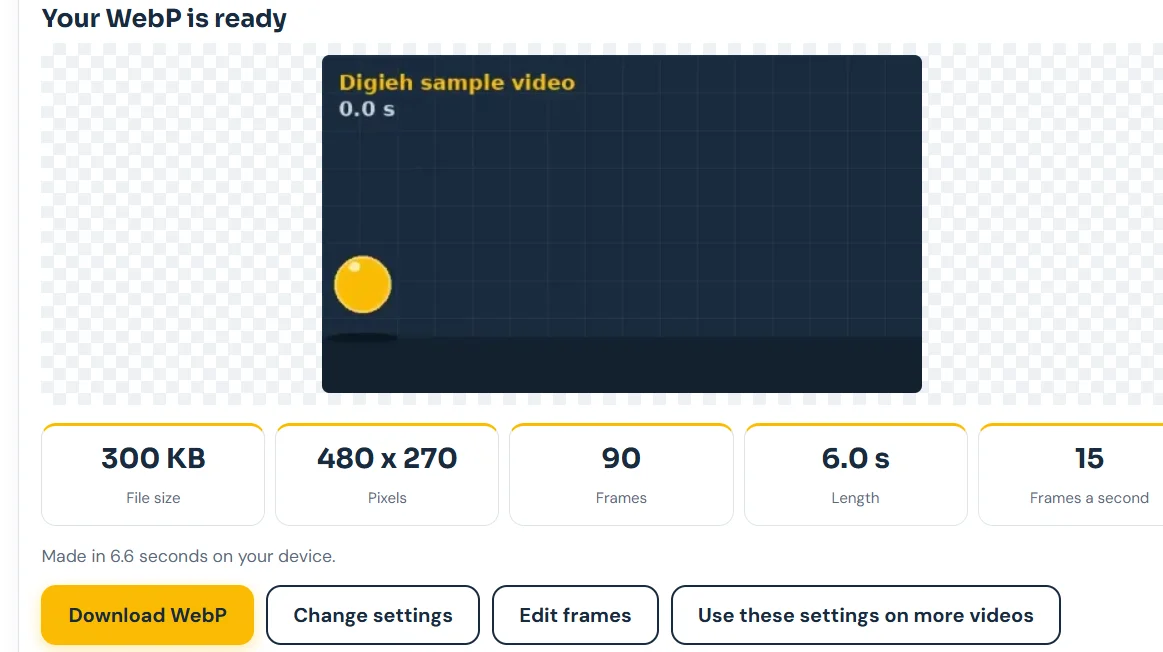
We tested it on November 21, 2026 with our free tool. A 6-second clip became a 300 KB WebP, about a third the size of the same GIF.
Key Takeaways.
- Animated WebP plays on a loop like a GIF but supports full color.
- Google says lossy animated WebP files are 64 percent smaller than GIFs on average.
- In our test, the same clip was 300 KB as WebP and 936 KB as GIF.
- All modern versions of Chrome, Edge, Firefox, Opera and Safari show WebP.
- For chat apps, MP4 is often smaller still, at 51 KB in our test.
Jump to a section
- How to convert MP4 to WebP
- What our test showed
- Why choose animated WebP
- When to use WebP, GIF or MP4
- Where WebP works
- Transparent loops and stickers
- Convert several videos the same way
- How to make a WebP smaller
- Common problems and fixes
- Using WebP on a website
- Frequently asked questions
- Conclusion
How to Convert MP4 to WebP
- Open our free Video to GIF tool in your browser.
- Choose your MP4, or tap Try our sample video to practice.
- Pick the part you want with the start and end handles.
- Choose a width. 480 pixels suits most websites and chats.
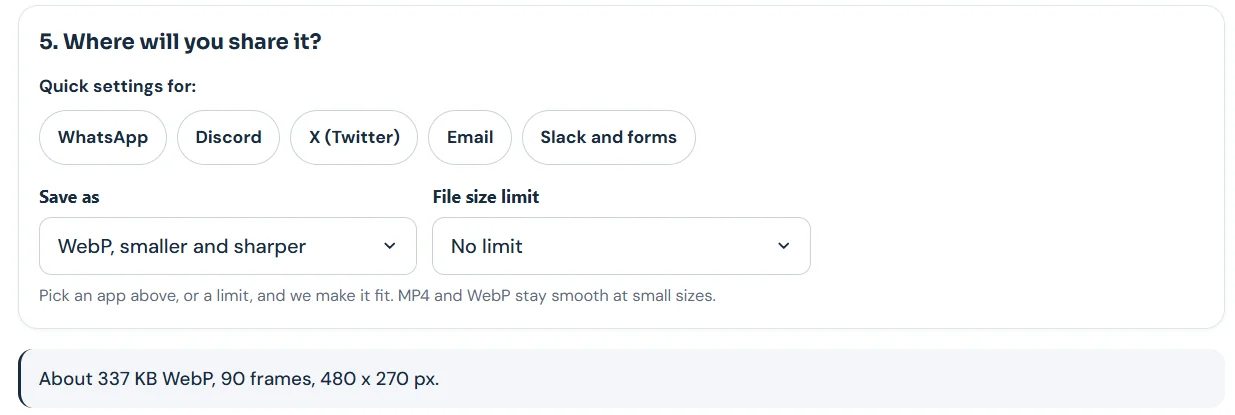
- Under Where will you share it, set Save as to WebP, smaller and sharper.
- Leave File size limit on No limit, or pick a limit you need.
- Tap Make my WebP, then Download WebP.
The tool works inside your browser, so your video is never uploaded. The conversion happens on your own device.
What Our Test Showed
| Format | File size | Time to make |
|---|---|---|
| MP4 video | 51 KB | 8.2 seconds |
| Animated WebP | 300 KB | 6.6 seconds |
| GIF | 936 KB | 5.6 seconds |
Source: Digieh tests on the Video to GIF tool, November 21, 2026. Same 6-second sample clip, 480 x 270 pixels, 15 frames a second, laptop browser.
68%How much smaller our WebP was than the GIF of the same clip, 300 KB versus 936 KB. Digieh calculation from our test.
That result lines up with Google’s numbers. Across about 7,000 GIFs, lossy WebP versions were 64 percent smaller on average, per Google’s WebP help page.
Why Choose Animated WebP?
- Smaller files than GIF, so pages load faster.
- Full 24-bit color with smooth transparency, says Google.
- Sharper results, since GIF is limited to 256 colors per palette.
- Loops just like a GIF.
Google notes GIF uses 8-bit color and 1-bit transparency, while WebP supports 24-bit color with an 8-bit alpha channel. That is why gradients and skin tones look better in WebP.
The trade-off
WebP can take more processing to play. Google says lossy WebP takes about 2.2 times as long to decode as GIF when played straight through.
On modern phones and computers, this is rarely noticeable for short clips.
With seeking, the gap flips. Google says WebP decodes faster than GIF when a viewer jumps around in the animation.
When to Use WebP, GIF or MP4
| Use | Best format | Why |
|---|---|---|
| Website or blog | WebP | Small and sharp, works in modern browsers |
| Chat apps | MP4 | Smallest file, plays as a silent loop |
| GIF | Plays in most mail apps | |
| Old apps or forums | GIF | Works almost everywhere |
| Stickers and transparent loops | WebP | Smooth transparency |
Based on our test, the Google WebP help page and the MDN image format guide.
MP4 can be even smaller. In a web.dev example, a 3.7 MB GIF became 551 KB as MP4.
Which format do you use most for short clips?
- GIF
- WebP
- MP4
- Not sure
Where WebP Works
WebP is supported in all versions of Chrome, Edge, Firefox, Opera and Safari, per MDN. On a Mac, Safari needs version 14 or later and macOS Big Sur or later.
Some older apps, email programs and editing tools still do not handle animated WebP. If someone cannot open it, send a GIF instead.
How to Make a WebP Smaller
- Pick a shorter section of the video.
- Lower the width to 320 or 480 pixels.
- Use 10 or 12 frames a second for simple motion.
- Set a File size limit so the tool fits the file for you.
- Crop to just the action with the Crop setting.
Our tool shows an estimate, like About 337 KB WebP, before you make the file. Adjust settings until the estimate fits your needs.
What changes the size most
| Setting | Effect |
|---|---|
| Clip length | Biggest, every second adds frames |
| Width | Large, wider means many more pixels |
| Frames a second | Medium |
| Crop | Medium, less area to store |
Based on settings in the Digieh Video to GIF tool.
Free updates
Join the Digieh list
Be the first to know when our weekly brief launches.
No spam. Unsubscribe anytime. Read our Privacy Policy.
Transparent Loops and Stickers
WebP can keep smooth, partly see-through edges thanks to its 8-bit alpha channel, Google says. GIF only has on or off transparency, which leaves jagged edges.
That makes WebP a strong choice for stickers and logos that sit on colored backgrounds. A video clip with a full background does not need transparency at all.
Convert Several Videos the Same Way
After your first WebP, tap Use these settings on more videos in the tool. It keeps your width, speed and format so the next clips match.
This helps when you make a set of loops for one page or one product. Every file comes out the same size and style.
Sharing WebP from a phone
You can open the tool in your phone’s browser too. The WebP saves to your downloads, ready to upload to a website or app.
Some phone galleries show only the first frame of an animated WebP. The animation still plays once you open it in a browser or app that supports it.
Common Problems and Fixes
| Problem | Fix |
|---|---|
| The WebP will not open | Use a modern browser or send a GIF instead |
| It shows only one frame | Open it in a browser, since some galleries show a still |
| The file is still large | Shorten the clip or lower the width |
| Text looks blurry | Use a larger width for clips with small text |
| Colors look off in GIF | Switch to WebP for full color |
Based on our test and the MDN image format guide.
Most issues come from older software, not the file itself. When in doubt, keep a GIF copy as a backup for people on older apps.
Using WebP on a Website
Upload the WebP like any image and add short alt text that describes the action. Most modern site builders accept WebP files.
Keep animated images short and avoid fast flashing. Smaller files also help your pages load faster on phones.
Need to shrink still photos instead? Our free image compressor handles them. For a broader look at video to GIF settings, see our full video to GIF guide.
A note on quality
Lossy WebP throws away some detail to save space, much like a JPG photo. For most clips you will not notice, but check fine text or logos in the preview before you publish.
If text looks soft, try a larger width or a shorter clip at a higher width. That keeps detail without a big jump in file size.
Sending clips in chat instead? Our guide on making a GIF for WhatsApp explains why MP4 often works best there.
Try this today. Convert the sample video to GIF and then to WebP. Compare the two file sizes yourself in under a minute.
Test Yourself
How much smaller are lossy animated WebP files than GIFs on average, according to Google?
- About 10 percent
- About 64 percent
- About 95 percent
Google’s WebP help page says GIFs converted to lossy WebP were 64 percent smaller on average.
Frequently Asked Questions
Can you convert MP4 to WebP?
Yes. Load the MP4 in our free tool, set Save as to WebP and download the result.
Is animated WebP better than GIF?
Usually, yes. It is smaller and supports full color. GIF still works in more old apps.
Do all browsers support animated WebP?
All modern versions of the major browsers do. Older software may not.
Conclusion
Converting MP4 to animated WebP gives you a sharp, looping clip at a fraction of a GIF’s size. Our test cut the file by about two thirds.
Your next step is to open the tool, set Save as to WebP and convert your first clip.
Editor’s Note
This article is accurate as of November 21, 2026. Size savings and color facts come from Google’s WebP help page and MDN. File sizes come from Digieh tests on our Video to GIF tool on November 21, 2026.
Spot an error in this article? Please contact us at support@digieh.com or read our Corrections Policy.
Keep exploring
Your next read is waiting
 1Food & LifestyleSpace Heater Cost Calculator: What One Room Costs7 min read
 2TechnologyTranslate Menu From Photo: Free Steps for Travelers7 min read
 3AI & TechHow to Turn Off AI in Everyday Apps7 min read
 4HealthLow Blood Pressure Symptoms: Causes and Warning Signs7 min read
 5BusinessUS Chip Export Rule: Five Countries Need Licenses4 min read
 6Pets & AnimalsCat Years Calculator: How Old Is Your Cat?7 min read
Found this useful?